The “Model catalogue” page is the control room for the whole catalog system, in two parts:
- Catalog enhancement (catalog mode): one switch plus the cache status, which decides whether the kernel reads the cache Coskey generates at startup;
- Entries and templates: three tabs — User catalog (your own entries), System catalog (overrides for the official base entries), and Catalog templates (the synthesis bases themselves).
The small print in the page header is the rule: everything on this page needs a ChatGPT.app restart —
the catalog cache is read once, when the kernel process starts. Nothing is ever written to ~/.codex;
only ~/.coskey/models/.
1. Catalog enhancement (catalog mode)
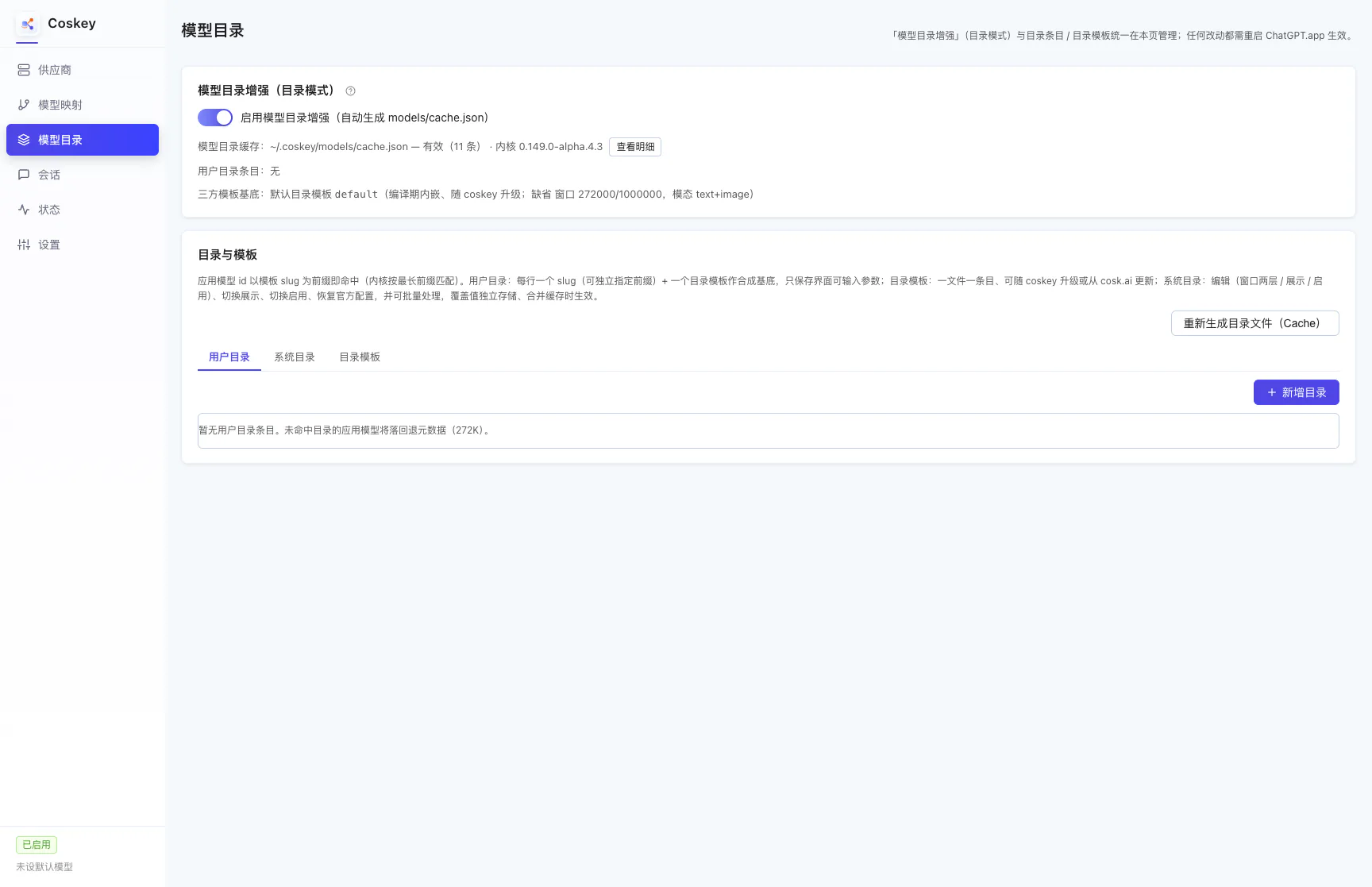
The switch “Enable catalog enhancement (auto-generates models/cache.json)” covers three things:
- Unlocking the window cap: third-party models can go past the kernel’s built-in 272K (and only then can the mapping page drag a larger window);
- Deciding the prompt and request shape of third-party models: taken from catalog entries instead of the kernel’s fallback metadata;
- Applying the official-base overrides: the window / shown / enabled values you edit on the System catalog tab.
The status line below the switch reports the cache path and entry count (valid, N entries), the kernel version, View details (every model name in the cache, whether it shows in ChatGPT.app, its default window and its window cap), plus “User catalog entries: N rows” and the default catalog template’s defaults.
Turning it off is destructive, so a confirmation lists what stops working first:
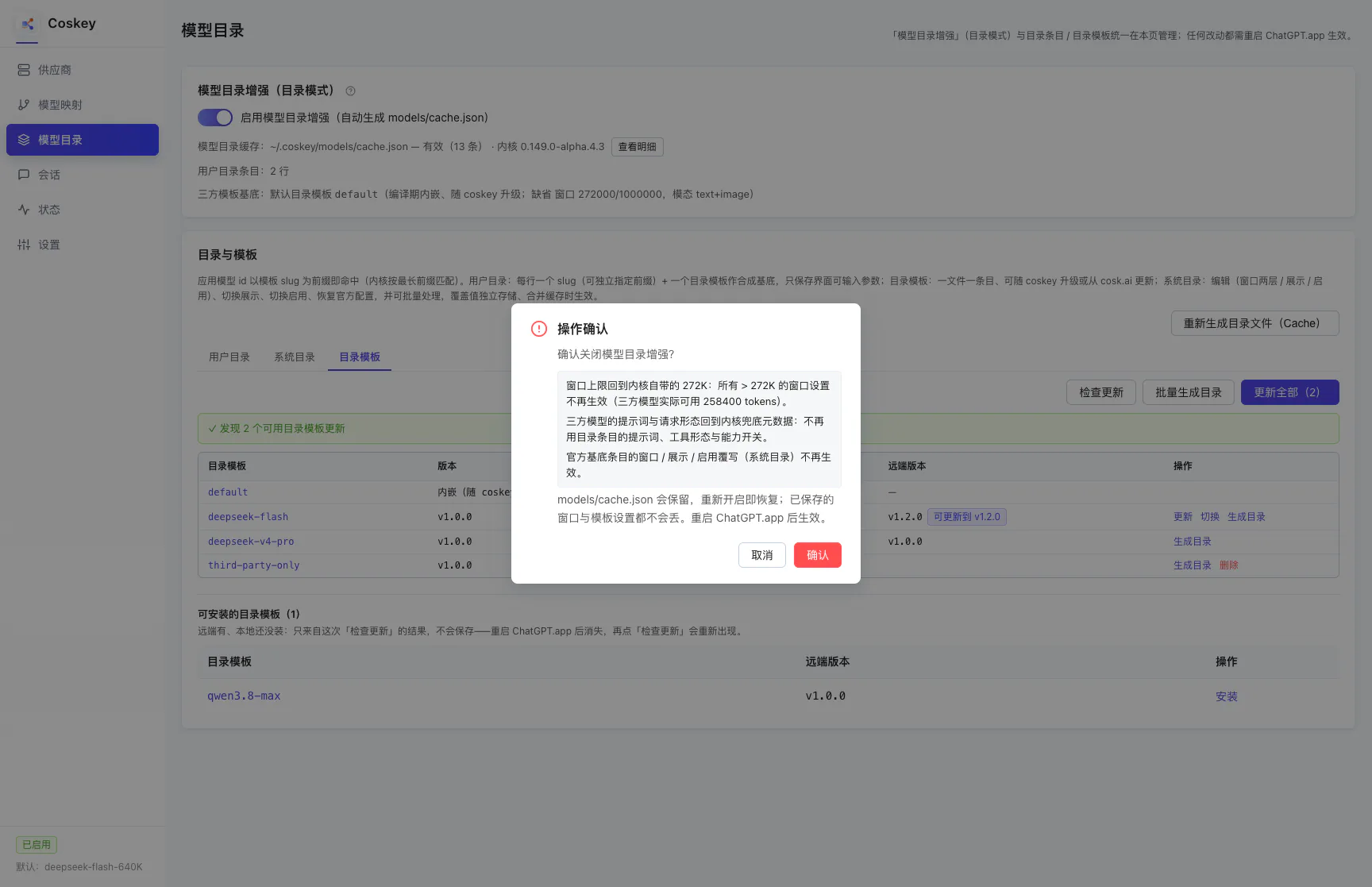
models/cache.json is kept, so switching it back on restores everything and no saved window or
template setting is lost. The change applies after you restart the app.
2. User catalog
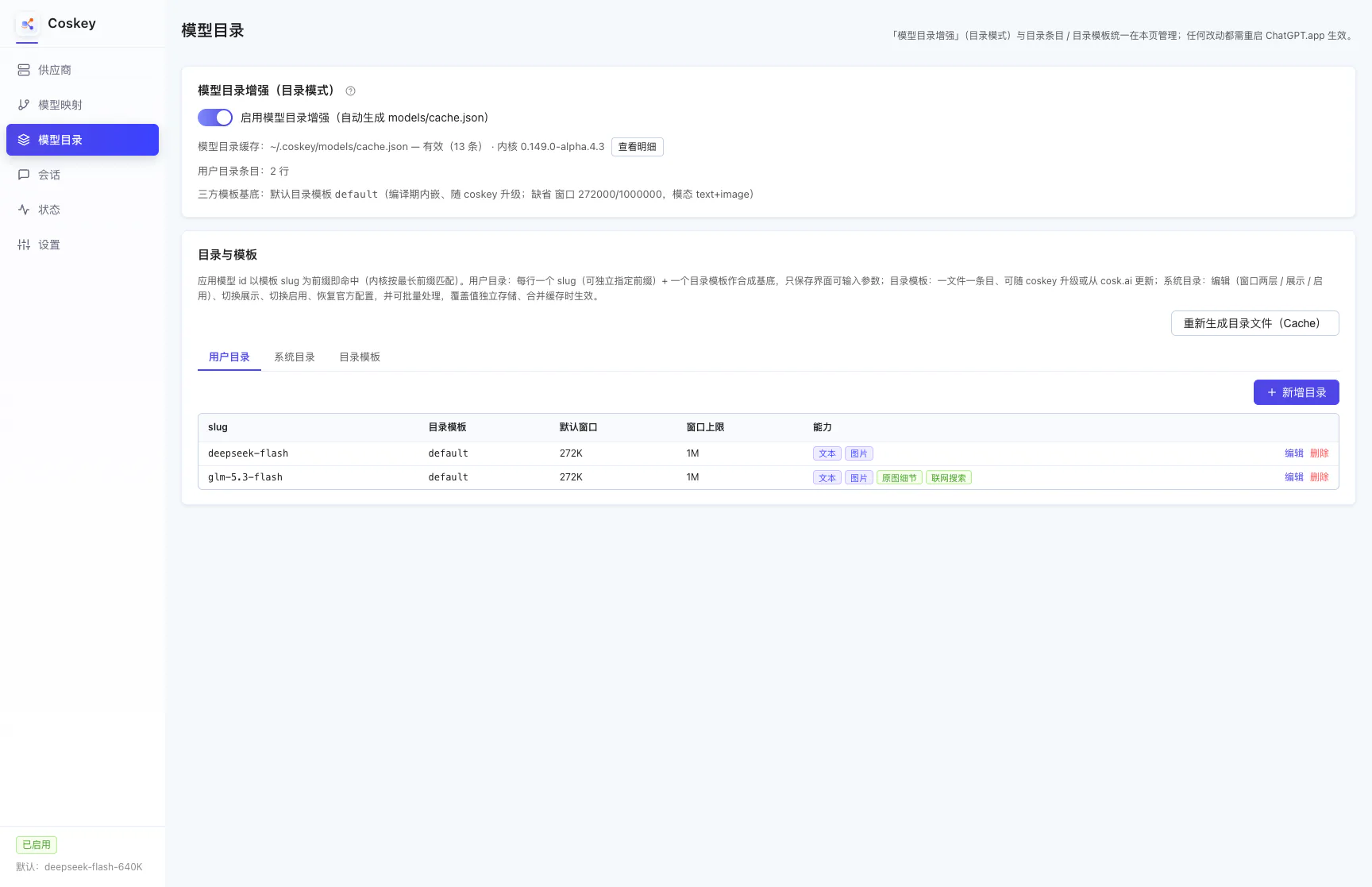
One row = one slug plus one catalog template (the synthesis base). A row stores only the parameters you can edit in the UI — the two window layers and the capability switches under “Advanced” — while the prompt and tool shape come from the base. Columns:
| Column | Meaning |
|---|---|
| slug | The entry name; an app model id matches this entry when the slug is its prefix (kernel longest-prefix match) |
| Catalog template | The synthesis base; the same base can back several rows (different prefixes / windows) |
| Default window / Window cap | The window range this entry offers (the mapping page’s slider follows it) |
| Capabilities | Input modality, original image detail, web search and other tags |
Each row has Edit and Delete on the right. “Add catalog entry” expands the form below the table:
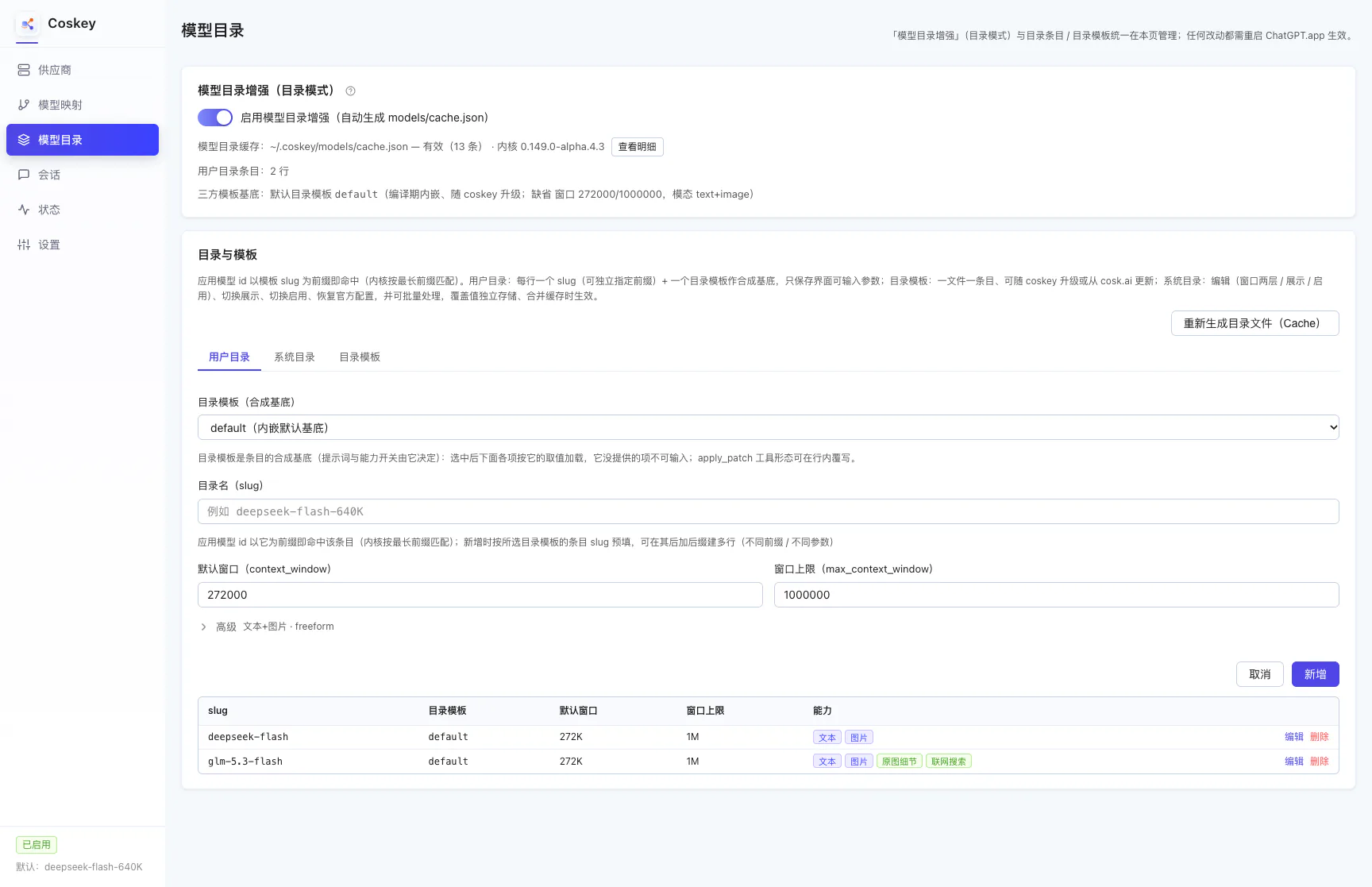
- The catalog template (synthesis base) comes first: choosing one loads every field below from it, and fields it does not provide cannot be entered (modalities are limited to the set the base declares, and capability switches can only be narrowed inside what the base enables);
- Entry name (slug): prefilled with the chosen template’s entry slug; append a suffix to build several rows;
- Default window / Window cap: usually just the values the base prefilled;
- The rest lives in the “Advanced” disclosure.
“Regenerate catalog file (cache)”, at the top right above the three tabs, is shared by all of them: it re-synthesises the user catalog entries through their catalog templates. Rows whose base is missing or malformed are skipped and named in the notice (kept as they are, without blocking the rest of the cache).
On first install Coskey seeds a same-named user catalog entry per built-in catalog template, expands the bundled templates into
models/third-party/and generates the catalog cache. The user layer is always present; the official base (System catalog) requires extraction from ChatGPT.app’s kernel. If Coskey is installed before the app, the cache initially contains only the user layer, and the wrapper fills in the rest after the app is installed and restarted. When a user catalog already exists it only fills the gaps, and neither reinstalling nor updating touches rows you changed (see Install and first run).
Built-in models commonly used in China
Coskey currently bundles seven catalog templates for models commonly used in China. On first install, the User catalog automatically creates entries whose slugs match the catalog templates, ready to use as synthesis bases:
| Model family | Built-in slug in the User catalog |
|---|---|
| DeepSeek | deepseek-flash, deepseek-v4-pro |
| Qwen | qwen3.8-flash, qwen3.8-max |
| Zhipu GLM | glm-5.3 |
| Kimi | kimi-k3 |
| MiniMax | MiniMax-M3 |
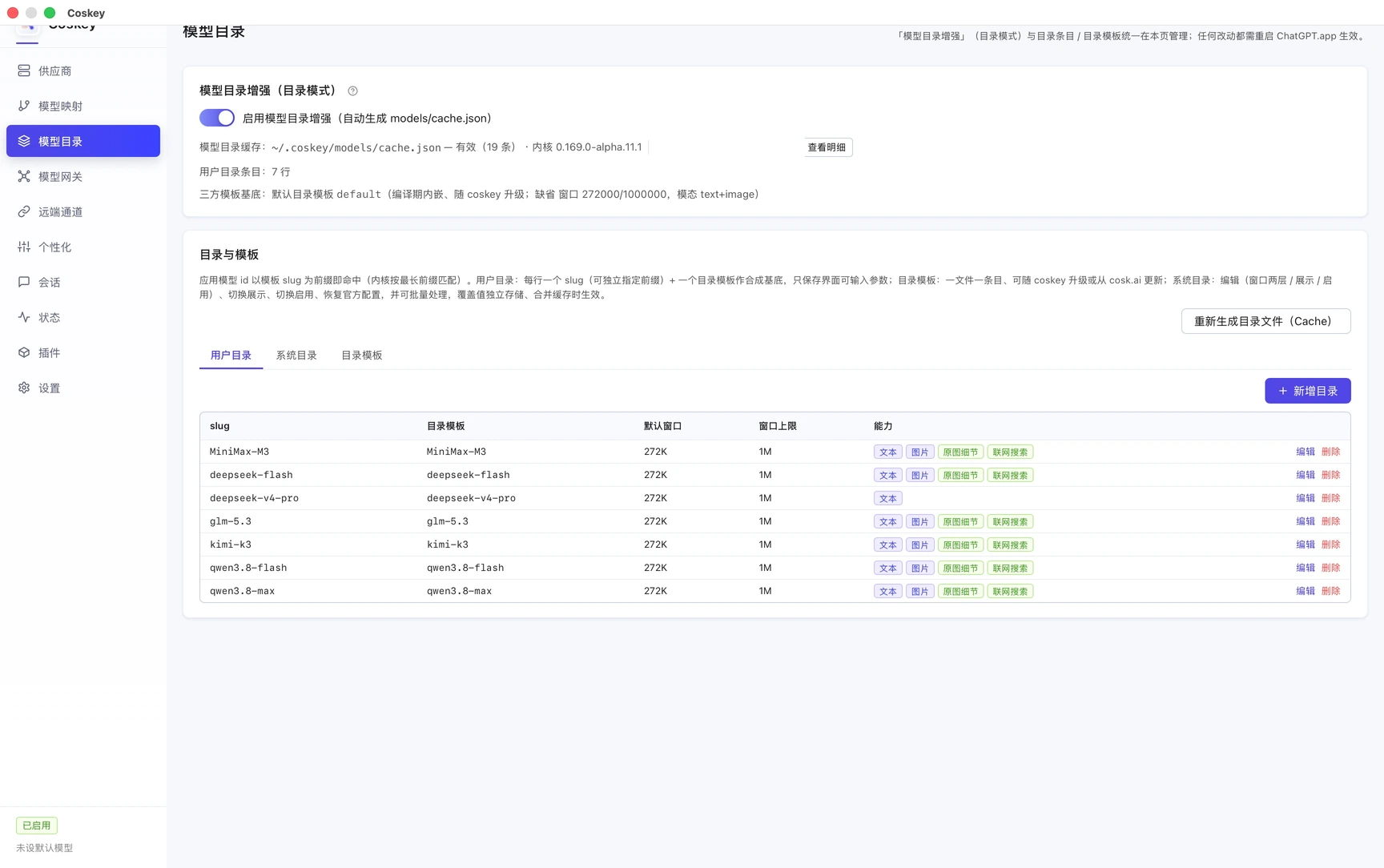
These templates start with a 272K default window and a 1M window cap. Except for deepseek-v4-pro,
which declares text input only, every template declares text and image input and includes original
image detail and web search capabilities. What actually works still depends on whether the provider
endpoint supports it.
Built-in entries only provide the catalog-layer prompt, request shape, windows and capability
switches; they do not mean that a provider and model mapping are already configured. To call one,
first add a provider and upstream model, then point an app model at it under Model mappings. An app
model id that starts with the matching built-in slug uses that catalog template. For example,
deepseek-flash-640K matches the deepseek-flash entry, but which provider and upstream model the
request actually reaches is still decided by the mapping’s target.
3. System catalog
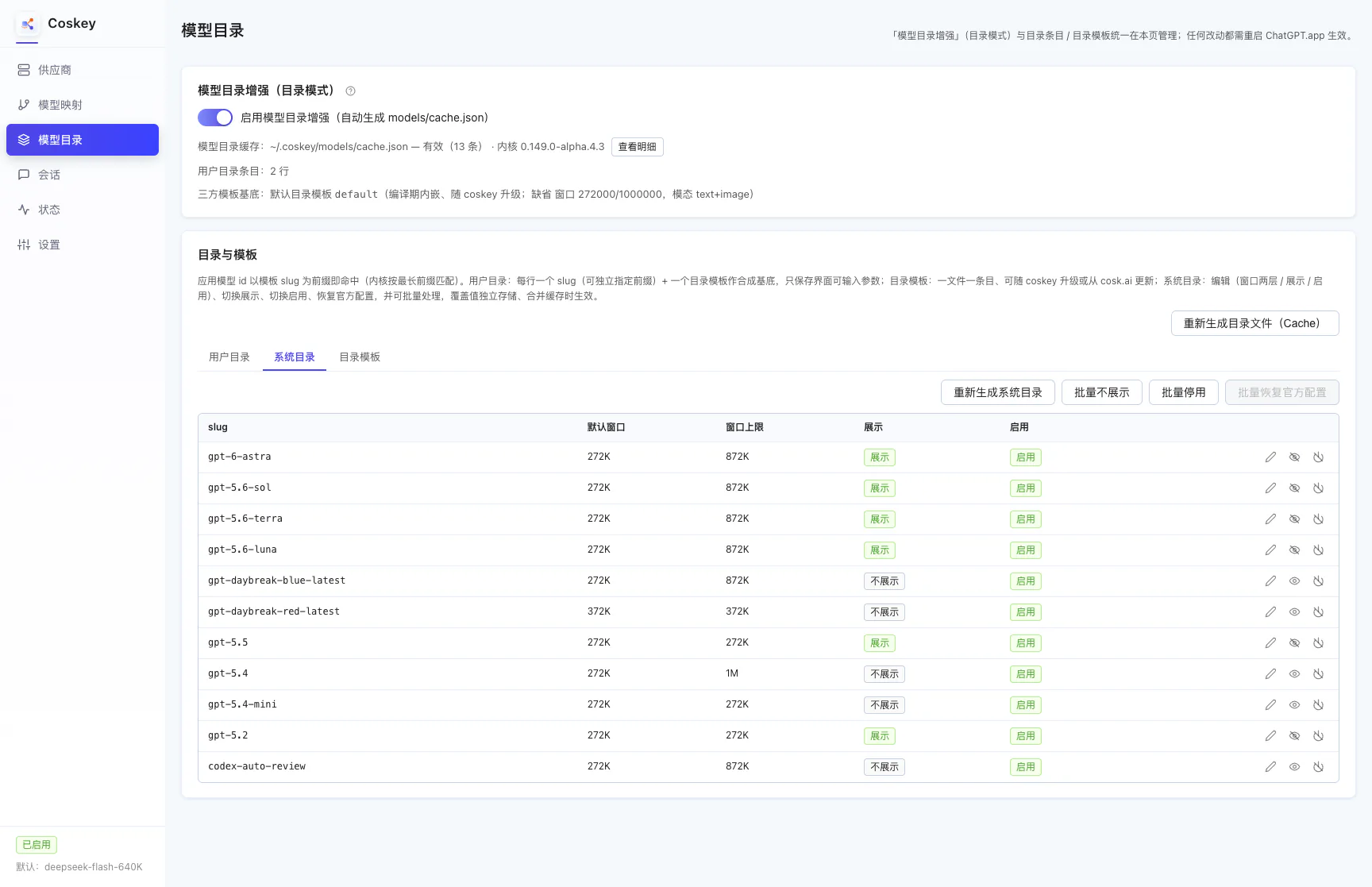
This lists the official base entries that ship inside the kernel. You cannot add, remove or rename them, but you can change how they behave in the app:
| Column | Meaning |
|---|---|
| slug / default window / window cap | The official entry’s name and two window layers (an override in effect is marked “overridden”) |
| Shown | Read-only status: whether this entry currently appears in the ChatGPT.app picker |
| Enabled | Read-only status: whether this entry is merged into cache.json |
| Action | Icon actions, in the order below; each icon reflects its action |
Icon actions in the action column:
| Action | Icon | Notes |
|---|---|---|
| Edit | Pencil | One dialog sets the default window / window cap, Shown (ticked = appears in the ChatGPT.app picker, cleared = stays in the catalog only) and Enabled, all saved together |
| Show / hide | Eye | Currently shown → crossed-out eye (click to hide); currently hidden → eye (click to show) |
| Enable / disable | Power | Currently enabled → crossed-out power (click to disable); currently disabled → power (click to enable). Disabled = the entry is left out of cache.json entirely (the app behaves as if it did not exist) |
| Restore official | Undo arrow (only once overridden) | Resets that row to the official values (window / shown / enabled overrides all removed) |
Overrides live in ~/.coskey/models/system-overrides.json, the official base file keeps its original
values, and the shown state follows a kernel upgrade that swaps the base. Two entries re-extract the
official base: the one at the top of the System catalog tab is always there, and the one in the
header’s drift notice appears only when content actually drifts.
The row that holds “Regenerate system catalog” also carries three batch actions on the right, all applying to every official base entry and asking for confirmation first:
| Batch action | Notes |
|---|---|
| Hide all | Overrides every entry’s shown state to hidden, keeping it out of the ChatGPT.app picker (the entries stay in the catalog) |
| Disable all | Sets every entry to enabled: false, leaving all of them out of cache.json. Refused when no user catalog entry can take over — leaving zero enabled entries would empty the catalog, and the kernel rejects an empty one |
| Restore all official | Clears every override in system-overrides.json (window / shown / enabled all return to the official values) |
Each batch is written once and the cache is re-merged once. An action with nothing to do (all already hidden / all already disabled / no overrides) is greyed out.
4. Catalog templates
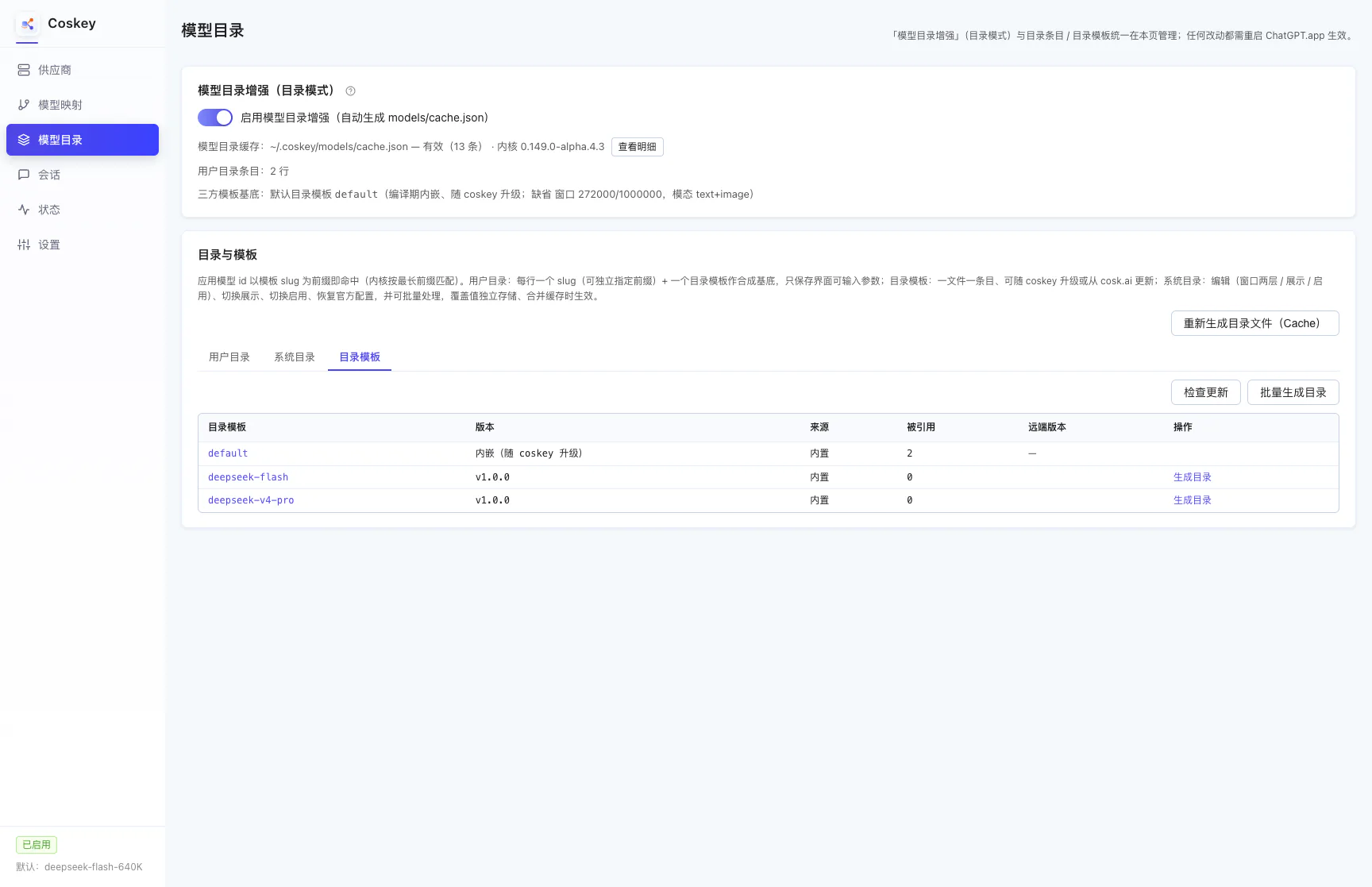
A catalog template is the synthesis base (one entry per file). The first row is always the bundled
default (it ships with Coskey and cannot be deleted). Columns: catalog template / version / source /
used by / remote version / action.
- Source:
Bundled(seeded with Coskey) /cosk.ai(downloaded from the site) /Local(yours); - Used by: how many user catalog rows use it as their base;
- Remote version: the result of comparing against the index after “Check for updates” — a newer one is marked “Can update to vX”.
“Check for updates” pulls the remote index once:
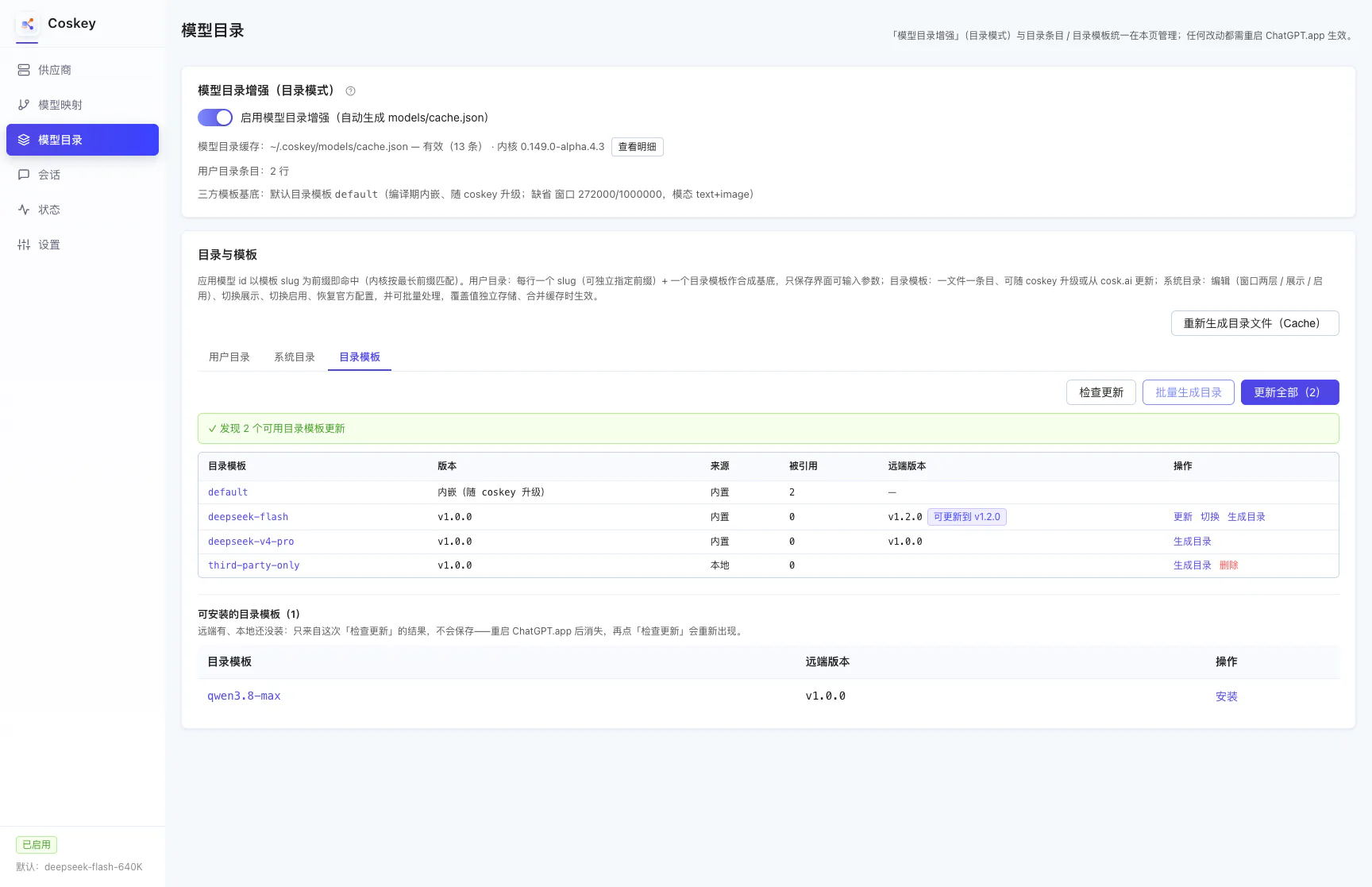
An “Update all (N)” action appears in the action bar, each row offers what it can do, and an “Installable catalog templates” table shows up — that table only reflects this check and is never saved, so it disappears after an app restart and comes back the next time you check.
Buttons in the action column appear by state:
| Button | When it appears | Notes |
|---|---|---|
| Update | A newer remote version exists | Always installs the latest version; the download is verified for sha256 and kernel shape |
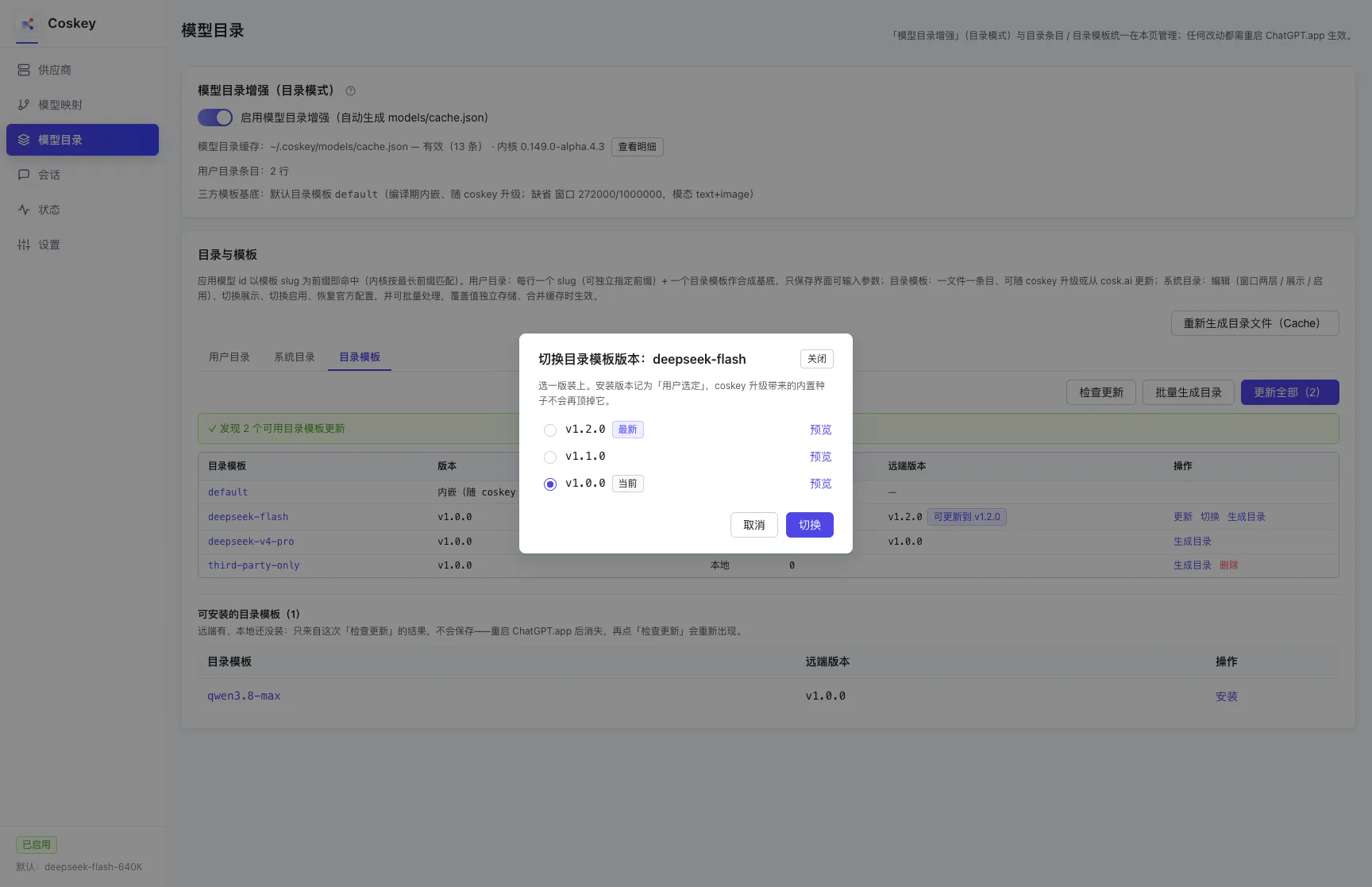
| Switch | Two or more versions are available | Opens a dialog to pick a version (historical ones included). A version you picked explicitly is recorded as your choice, and the seeds a Coskey upgrade brings will not override it |
| Generate | No user catalog row references it | Creates a same-named entry on the User catalog tab (slug and base are this template’s id, with values computed from the template) |
| Delete | Not a bundled template | Removes the local template file; user catalog rows referencing it are marked “catalog template missing” and skipped when merging — the rows themselves stay |
“Generate all” in the action bar is the batch version of “Generate”: it creates a same-named user catalog entry for every template with a reference count of 0 (the first install also fills these in automatically).
Switching versions:
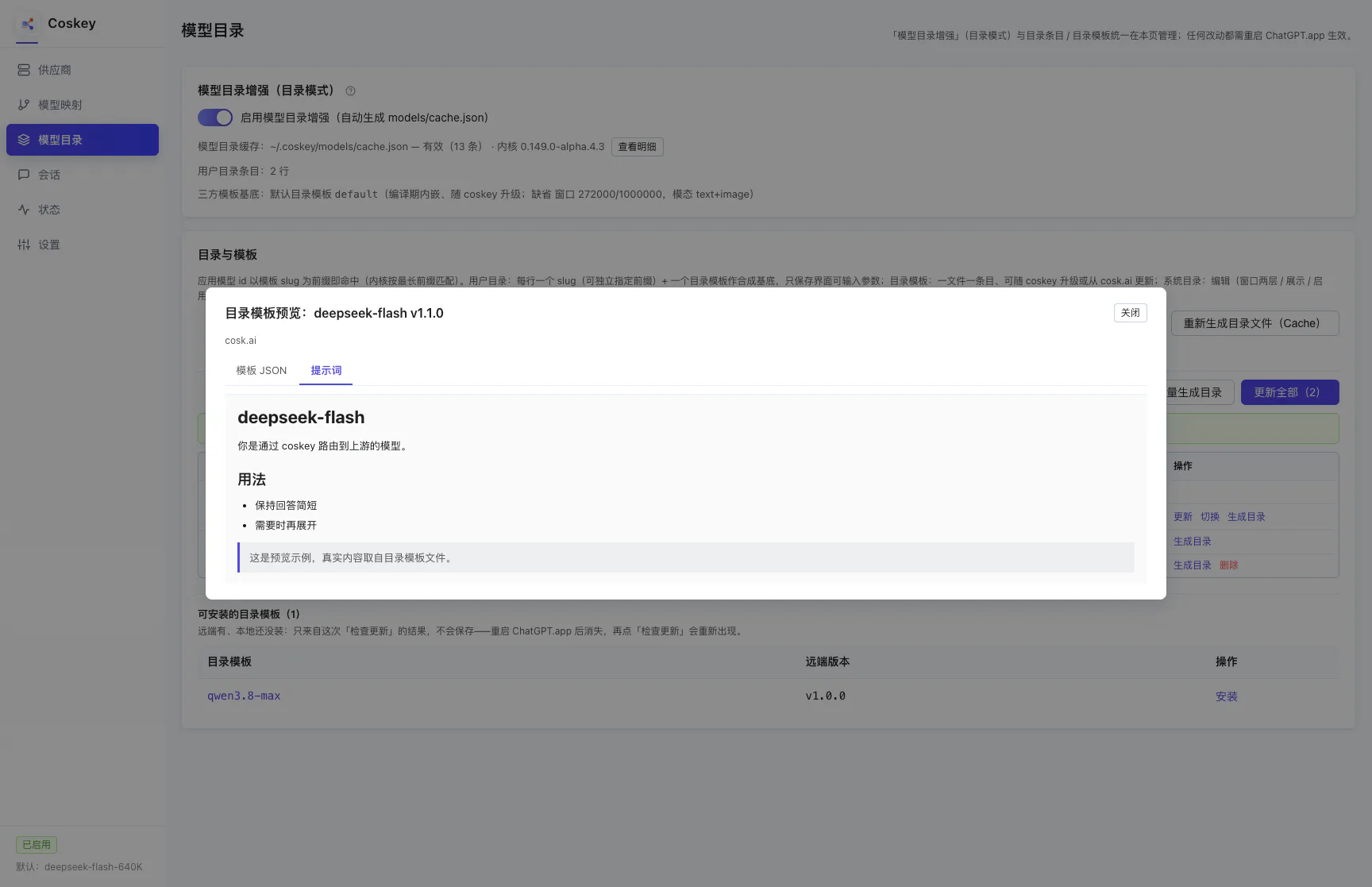
Preview: click a template name in the table (including the default row) to open the preview
dialog with two tabs — “Template JSON” and “Prompt”. A version that exists upstream but not locally is
downloaded and verified first, then shown without installing anything:
Where templates download from is decided by the download mirror in Settings (automatic / GitHub / Gitee) — the same preference used for update manifests and provider presets.
5. Taking effect and troubleshooting
Everything on this page needs a ChatGPT.app restart: the catalog cache is read once, when the kernel starts. Mappings (retargeting / window / enabling and disabling) are a different matter and apply immediately — see Mappings and context windows.
| Symptom | Cause / fix |
|---|---|
| The window slider stops at 272K on the mapping page | The model id matches no catalog entry: add one on the User catalog tab whose slug is its prefix (the mapping page also has a “+ User catalog” shortcut) |
| A row says “catalog template missing” | Its base template was deleted (or the file is gone): point it at another base, or delete the row; merging skips it |
| A row says “Overridden” | The official entry was edited on the System catalog tab; use that row’s “Restore official” icon (or “Restore all official”) if you do not want to keep it |
| Turning enhancement off kills every large window | Expected: the kernel returns to its built-in catalogue (272K). Switch it back on and restart the app to restore everything, settings included |
| The “Installable” table is gone after a restart | That table only comes from the last “Check for updates” and is not saved; check once more and it returns |
| Checking for updates reports an index from the local cache | Networking failed and the local cache is the fallback; retry as prompted, or run the speed test under “Download mirror” in Settings first |
Next: Using it inside ChatGPT.app.