1. When you need this page
ChatGPT.app writes a session’s provider into the kernel database when the session is created. If that provider is later deleted or renamed (a changed gateway, a cleanup of old providers, a temporary entry added and removed from the CLI), those historical sessions fail on open: the session is still there, but the provider it points at no longer resolves.
The Coskey “Sessions” page makes this visible and offers two ways out:
| Way out | What it does | When to use it |
|---|---|---|
| Adopt (take over) | Rewrites the session’s provider to the local Coskey relay: it opens normally again, and you can still switch models inside it | Sessions whose provider no longer resolves; or unmanaged sessions you want Coskey to handle |
| Hand over (give back) | Writes a natively resolvable provider back (such as openai), returning the session to ChatGPT.app / codex |
Sessions you want out of Coskey’s hands, or ones that should use official models |
2. Reading the Sessions page
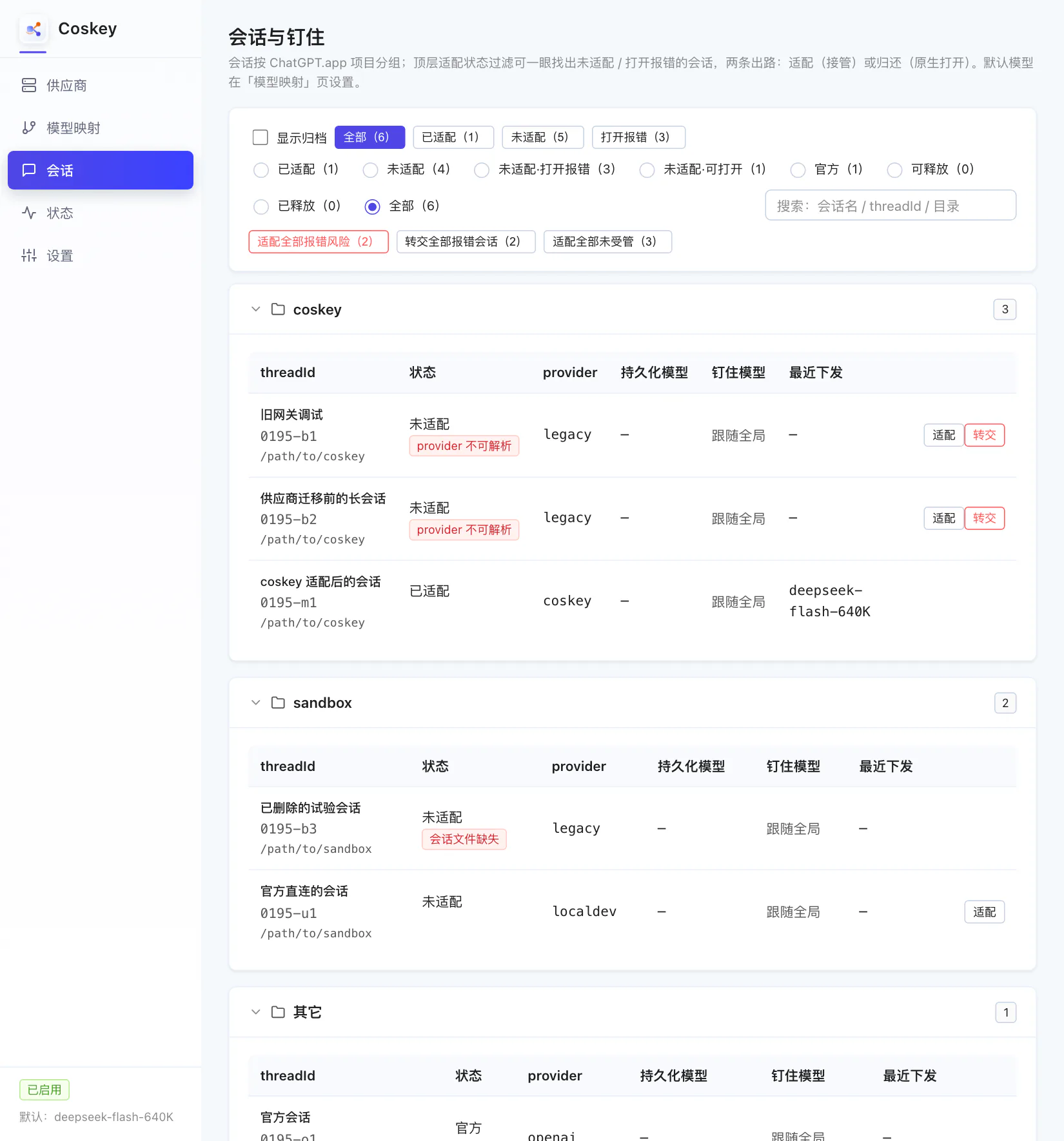
- Adoption state at the top: all / adopted / not adopted / fails to open, with counts;
- Filters and search: search by session name, thread id or directory;
- Grouped by project, matching the projects in ChatGPT.app’s sidebar, with unassigned ones collected under “other”;
- Each row shows the thread id, state badges, stored provider, stored model, pinned model and last activity, with per-row “Adopt” and “Hand over” buttons;
- State badges:
provider unresolvable(recoverable),session file missing(the rollout is gone — neither adopting nor handing over can save it),archived,in use,residualandwindow pending.
3. One-click adoption: fixing “historical session fails to open”
Click “Fails to open (N)” and the list keeps only the problematic sessions:
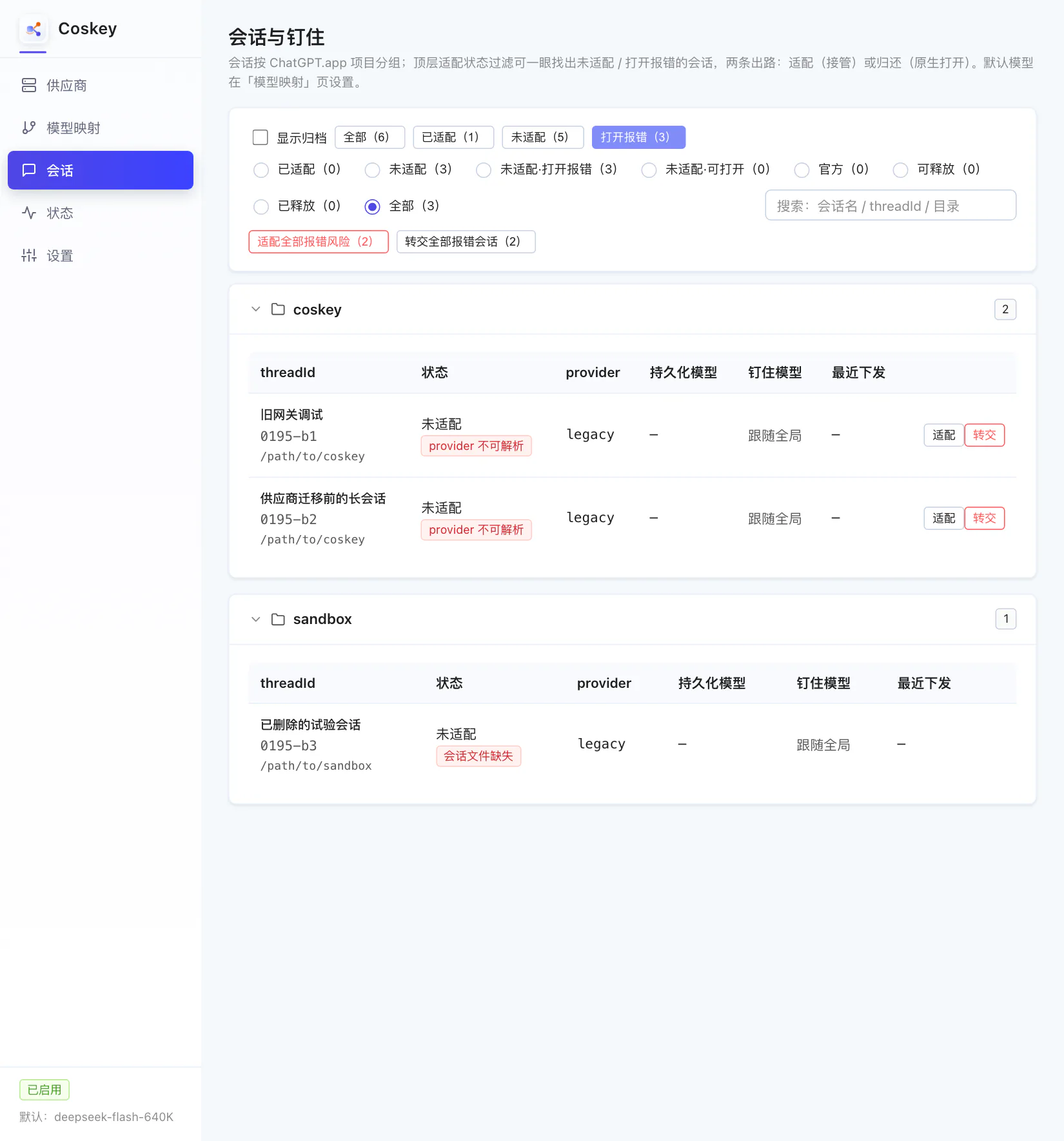
- Two rows show
provider unresolvable(a provider namedlegacy, long gone from the configuration) — these are recoverable; - One row shows
session file missing— the rollout file is gone, and no provider rewrite can bring it back; handle it (or delete it) inside ChatGPT.app; - So the buttons only count what can actually be handled: “Adopt all at-risk sessions (2)” and “Hand over all failing sessions (2)” skip the missing-file row.
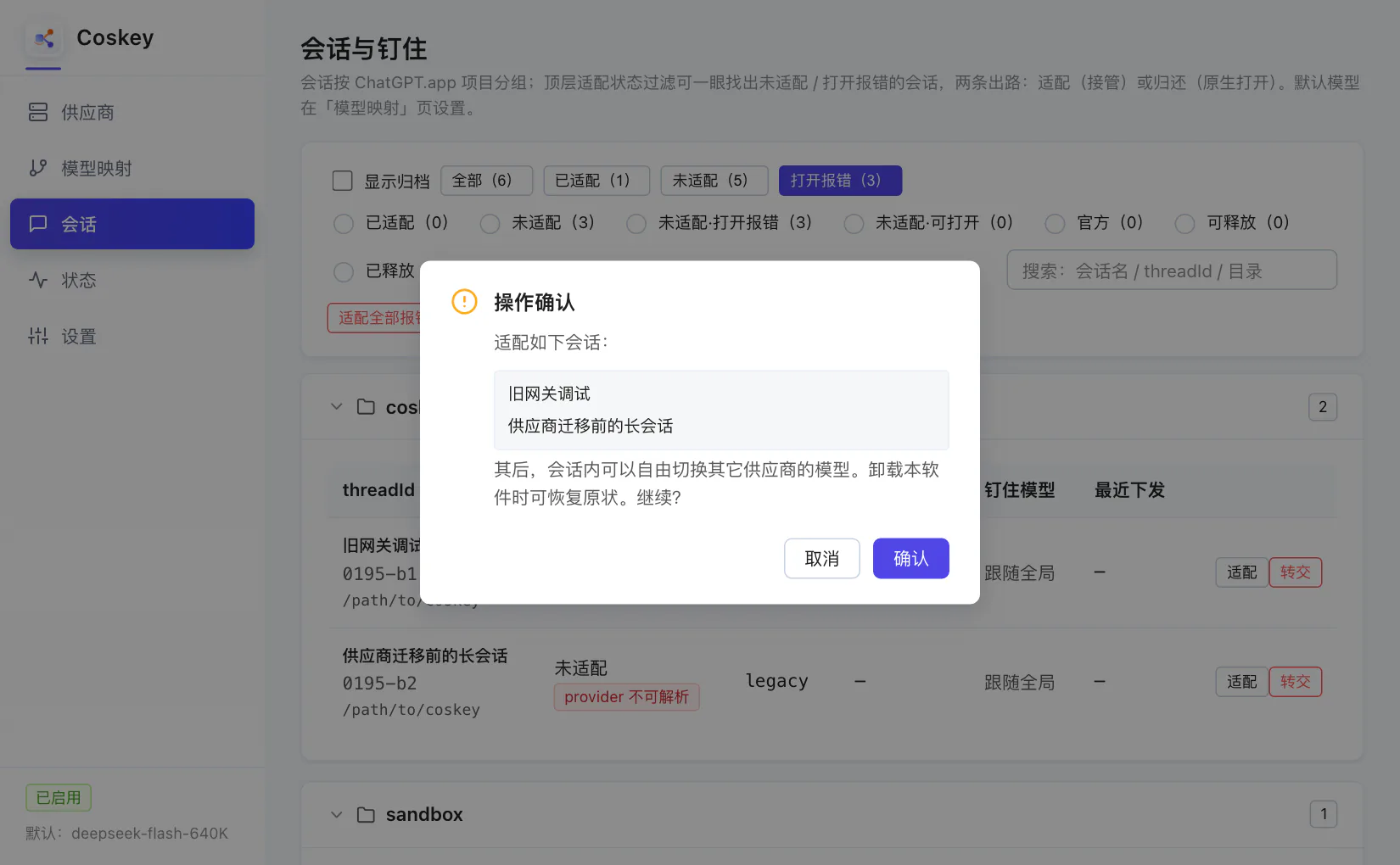
Click “Adopt all at-risk sessions (2)” and the confirmation dialog lists exactly which sessions are about to be rewritten:
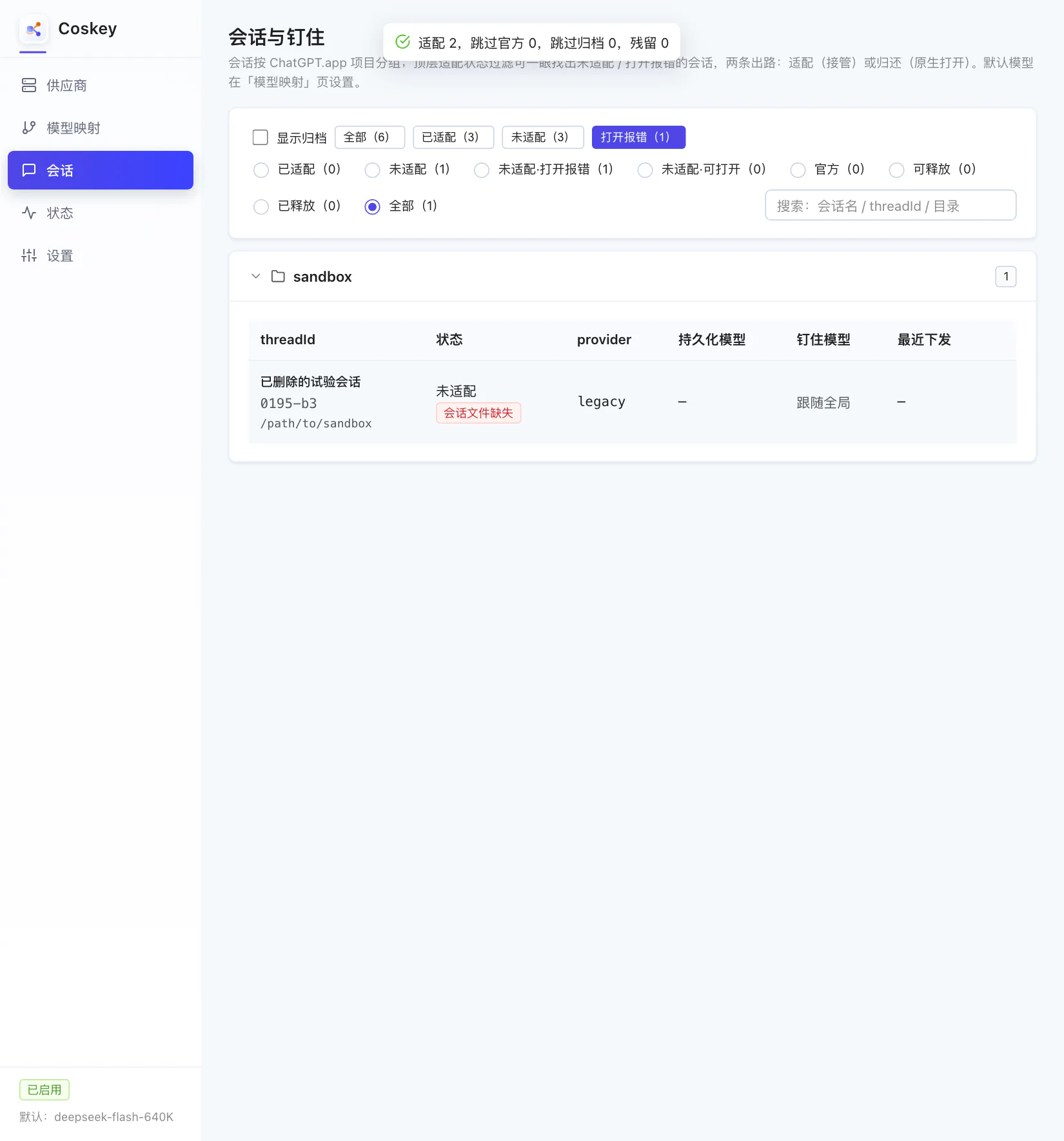
After confirming, their provider becomes coskey and the banner reports “adopted 2, skipped
official 0, skipped archived 0, residual 0”, leaving only the unrecoverable row behind:
Switch to “Adopted (3)” to check the result: the provider is coskey and the last model sent
is the current default:
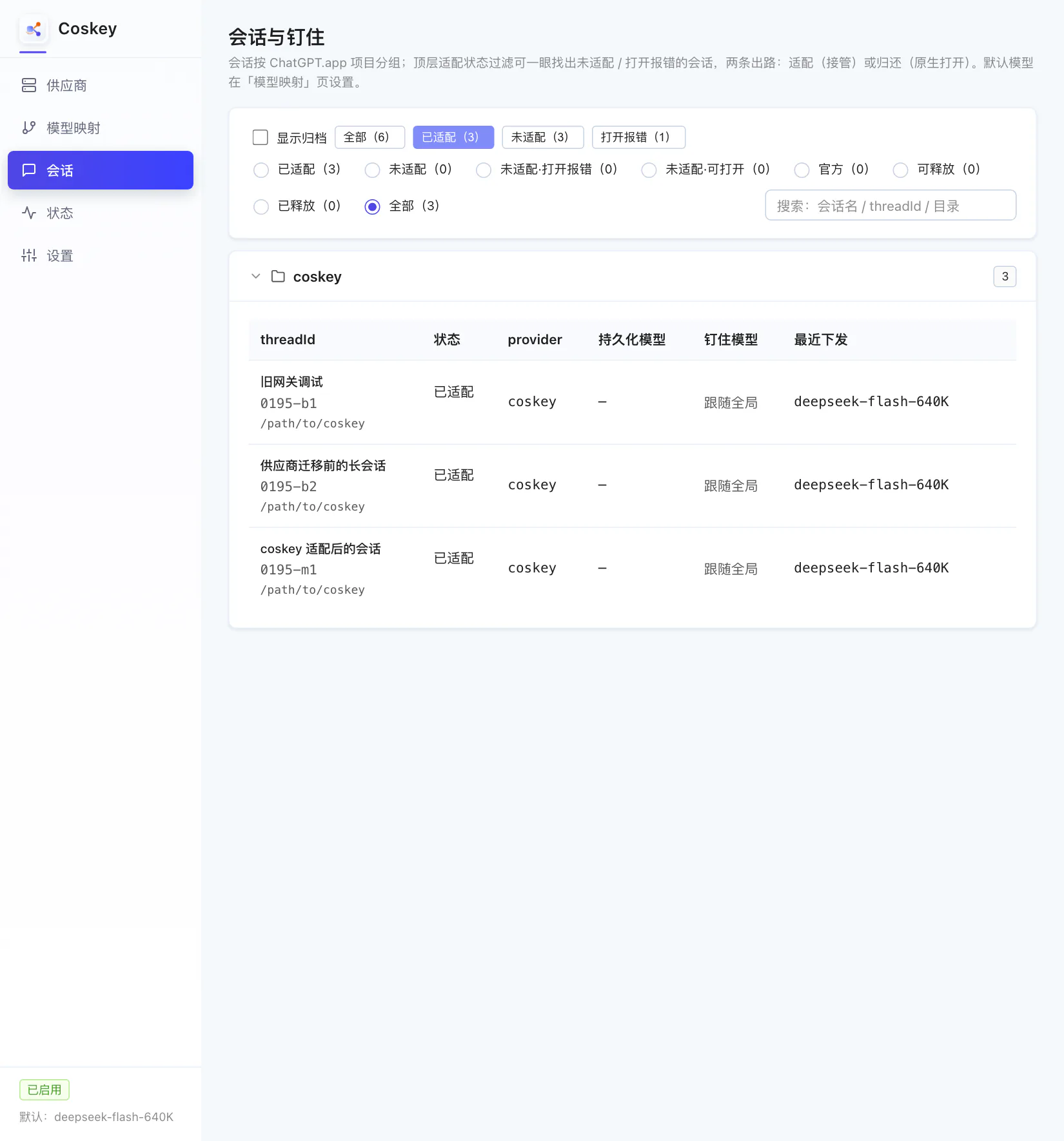
Those sessions now open normally in ChatGPT.app, with their contents untouched, and you can still switch to other providers’ models inside them. Adoption only rewrites the provider field and records the previous value — uninstalling Coskey can put it back with “restore the pre-adoption provider”.
4. Per-row actions and the other filters
- “Adopt” and “Hand over” on a row affect that session only — useful for rescuing one session precisely;
- “Hand over” asks for a natively resolvable target provider (
openai, or any name defined in~/.codex/config.toml). Afterwards the session opens natively in ChatGPT.app / codex without Coskey, and you can adopt it again at any time; - “Not adopted · opens fine” lists sessions whose provider still resolves but which Coskey does not manage — adopt them in bulk to manage everything, or leave them alone;
- “Releasable” lists sessions that could be given back; “hand over all releasable” returns them in one go;
- “Show archived” is off by default: archived sessions are neither counted nor listed (Coskey never changes archive state).
5. How this maps to the CLI
| GUI action | CLI equivalent |
|---|---|
| Adopt one or many | coskey take-over <threadId>... [--all] [--pin <model>] |
| Hand over one or many | coskey hand-over <threadId>... [--all] [--to <provider>] [--dry-run] |
| Release a pin | coskey unpin <threadId> |
| List sessions | coskey threads [--group] [--adapted yes|no|broken] |
6. Common questions
| Symptom | Cause / fix |
|---|---|
| Opening a historical session always fails | Its stored provider no longer resolves: adopt it from the “Fails to open (N)” view |
| Still fails after adoption and the row says “session file missing” | The rollout file is gone (the kernel database points at a file that no longer exists); Coskey cannot repair it — handle that session in ChatGPT.app |
| Does adoption change my session contents? | No: it rewrites the provider field in the kernel database and records the previous value on Coskey’s side |
| I no longer want Coskey managing a session | Use “Hand over” to return it to a natively resolvable provider (the kernel database is backed up first) |
| The counts do not add up | “Show archived” is off by default and archived sessions are not counted; sub-agent sessions expand with their parent |
Next: Status and settings.