Codex has two entry points, and their model lists come from different places:
| Entry point | Where you use it | Who provides the models | Main entry |
|---|---|---|---|
| Remote Codex | An SSH project in ChatGPT.app | The local Coskey model gateway (except the single-model direct-provider mode) | Coskey → Remote tunnels |
| Local Codex CLI | A terminal on this computer | The temporary relay started by coskey codex |
coskey codex |
Before you start, create and enable the third-party model in
Mappings and context windows. Pickers and configuration use the
app model id, not the provider’s upstream model name. Use that id in -m and in manual
provider configuration.
1. Remote Codex: choose a connection mode
The model picker in a remote project is answered by the remote Codex app-server. The Coskey wrapper inside ChatGPT.app does not push the local picker entries directly to the remote host. The remote host must first receive a provider through Remote tunnels.
1.1 Remote Codex depends on the model gateway
Remote Codex’s model catalogue and model requests both depend on the Coskey model gateway on this computer. Remote tunnels do not provide models themselves: they point the remote Codex loopback address through an SSH reverse tunnel at the local gateway. All four conditions must hold:
- Coskey is running. Closing the window to the system tray keeps the gateway running; actually quitting Coskey stops it;
- the model gateway is enabled and its process is running;
- the gateway client bound to the remote host is enabled and its Allowed models contains the models you want to select;
- the remote tunnel for that host is running and its reverse tunnel reaches the local gateway.
If any condition is missing, SSH or the remote project may still open, but the model picker will be empty, new models will be missing, or requests will time out or return an authentication error. The model gateway is the model source for remote Codex, not merely an optional diagnostic page.
Click Connect on the target host and choose one of two model sources:
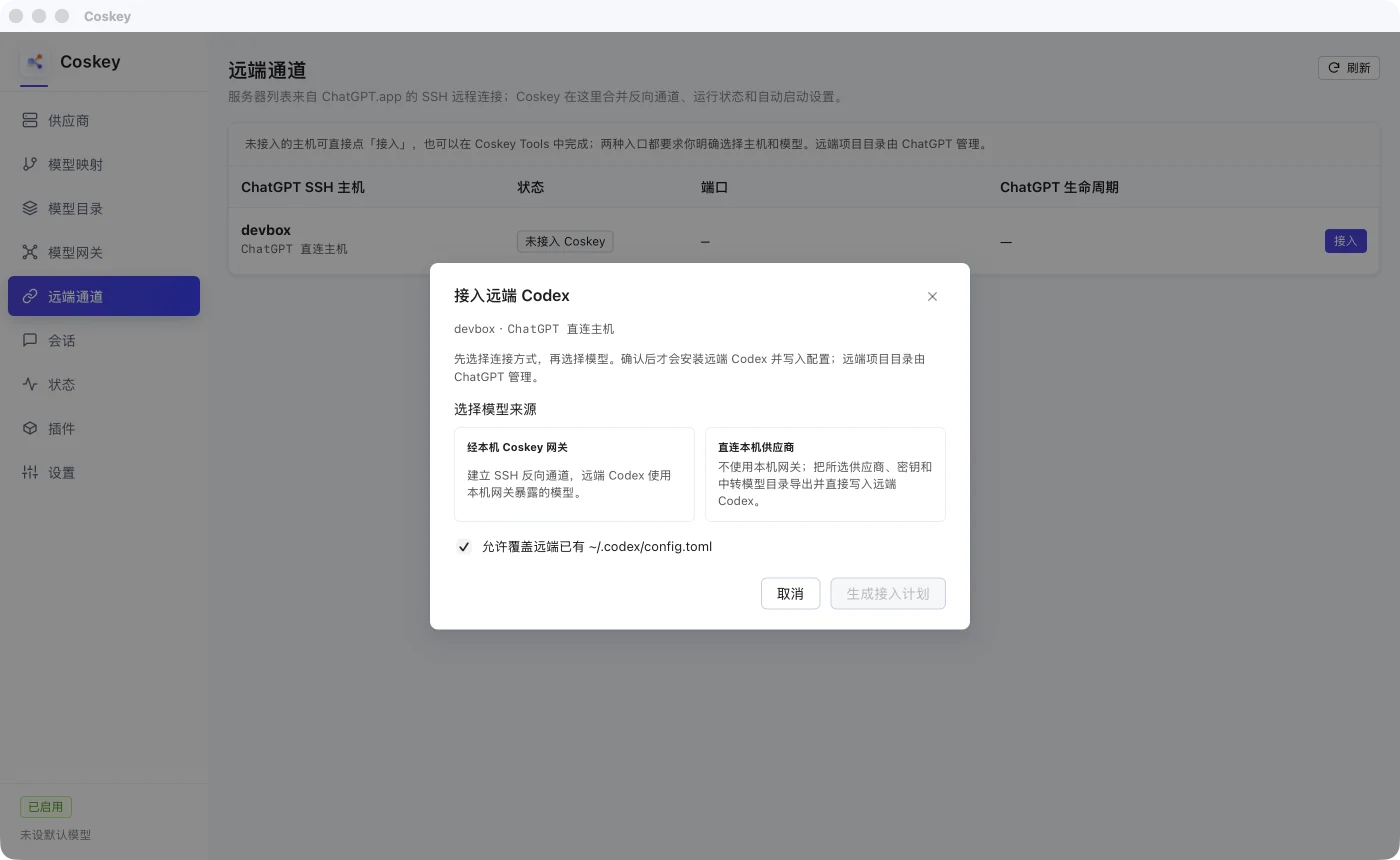
| Mode | How models are selected | Best for |
|---|---|---|
| Through the local Coskey gateway | Select several models allowed for a gateway client | One remote host needs several models or frequent switching |
| Direct to a local provider | Select one provider and one native Responses upstream model | A remote host needs one fixed provider model and can reach the upstream directly |
Use Through the local Coskey gateway when you want to switch among several models remotely.
2. Through the gateway: the client allowlist defines the picker
2.1 Choose or create a client
Select Through the local Coskey gateway, then reuse an existing client or create one.
- An existing client shows its current allowlist read-only. To change it, return to Model gateway → Allowed models → Edit; remote setup never rewrites those permissions.
- For a new client, every selected model is added to its allowlist. The first selected model also becomes the remote Codex default.
- Official and third-party models appear in the same candidate list and can be selected together.
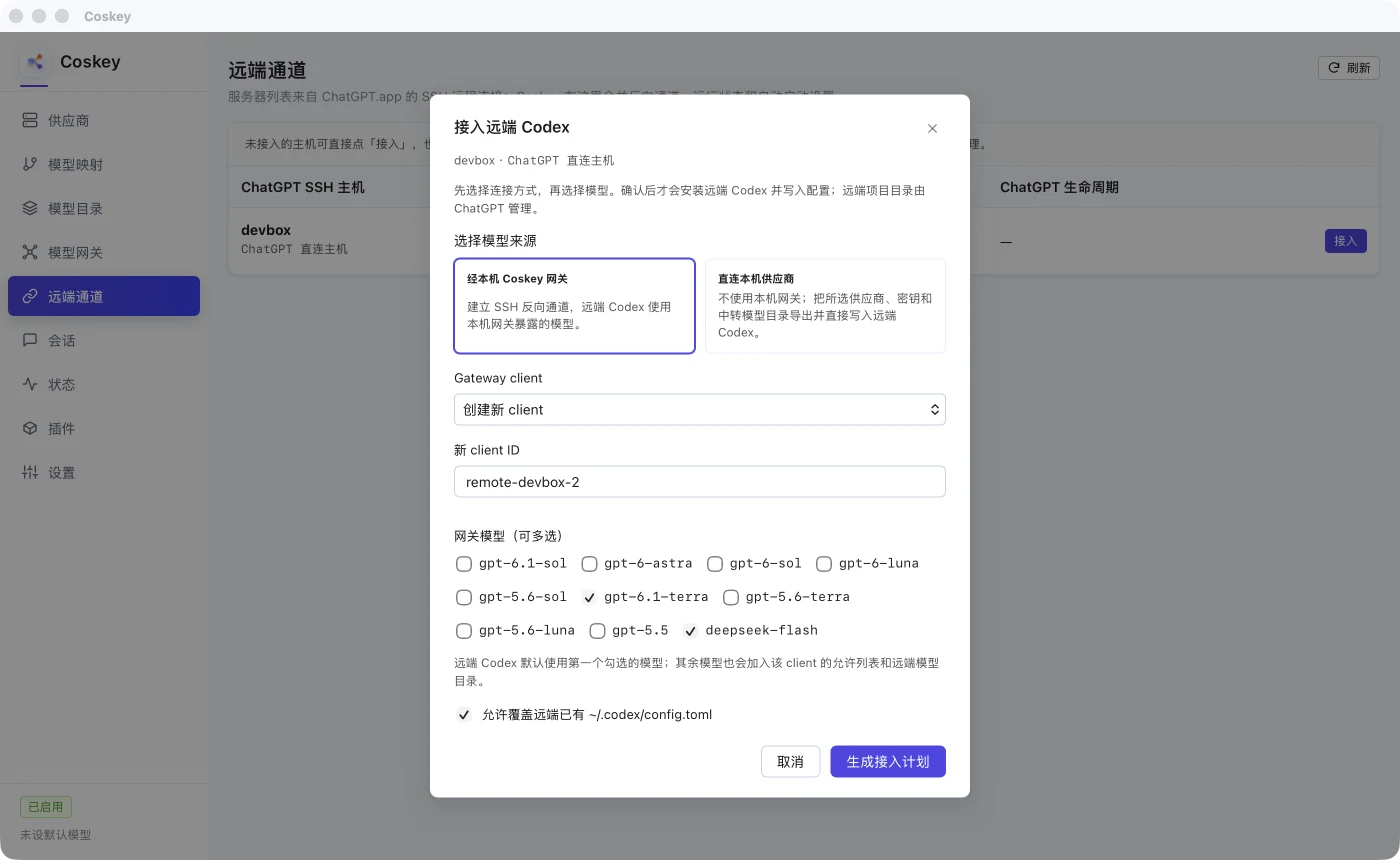
Generate and confirm the connection plan. Coskey configures the remote provider, model catalogue, dedicated token and reverse tunnel. The remote host needs neither Coskey nor your provider API key.
2.2 Reconnect the remote and open the project
A running remote app-server does not reload provider configuration automatically:
- Open Settings → Connections in ChatGPT.app and disconnect, then reconnect the SSH host;
- open a project directory on that host;
- open the model picker at the bottom right and choose a Coskey model allowed for the client.
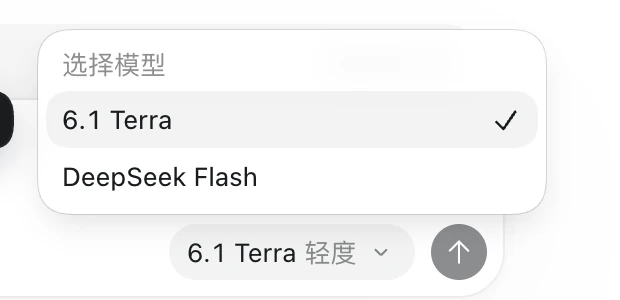
If the list is empty, has only one model or is missing a newly added third-party model, check:
- whether the gateway client’s Allowed models includes the target app model id;
- whether the remote host has been reconnected so the app-server reloads the provider and catalogue;
- Codex’s roughly five-minute catalogue cache. Reopen
/modelor reconnect the host to refresh it immediately.
On a terminal on the remote host, inspect the catalogue ids directly:
codex debug models | jq -r '.models[].slug'The output should contain the app model ids allowed for your gateway client.
2.3 Switch during a session
After changing the remote model picker, the round already in flight keeps the old model. The next request uses the new model. Third-party and official models can coexist in one list. Official models use the Coskey host’s ChatGPT subscription; third-party models use their provider’s quota.
3. Direct to a provider: one fixed upstream model
Direct to a local provider uses neither the local gateway nor a reverse tunnel. It configures the remote Codex with one Coskey provider, one native Responses upstream model and that provider’s key. Requests go directly from the remote host to the provider, and the remote account stores the key.
This mode is for one fixed model. If you need to switch among several models, reconnect with Through the local Coskey gateway instead of layering several remote provider configurations.
4. Local Codex CLI: use /model to select Coskey models
The main local CLI path is not to pin a model at launch. Start with coskey codex, then run
/model in the interactive interface. The launcher puts currently enabled, valid Coskey app
models into Codex’s dynamic model catalogue, so third-party models can be selected directly from
the list without hand-maintaining provider configuration or enabling the fixed gateway first.
4.1 Prerequisite: configure a DeepSeek app model in Coskey
Before launching the CLI, create and enable the DeepSeek app model in Coskey’s
Mappings and context windows. The /model list comes from those enabled,
valid mappings; it does not read the provider’s raw upstream model list directly.
In the example below, the display name DeepSeek Flash maps to app model id deepseek-flash and
targets the upstream model deepseek/deepseek-flash. The display name only affects the interface;
the /model entry and its routing both depend on this enabled mapping. If the mapping is missing or
disabled, the corresponding DeepSeek model does not appear in /model.
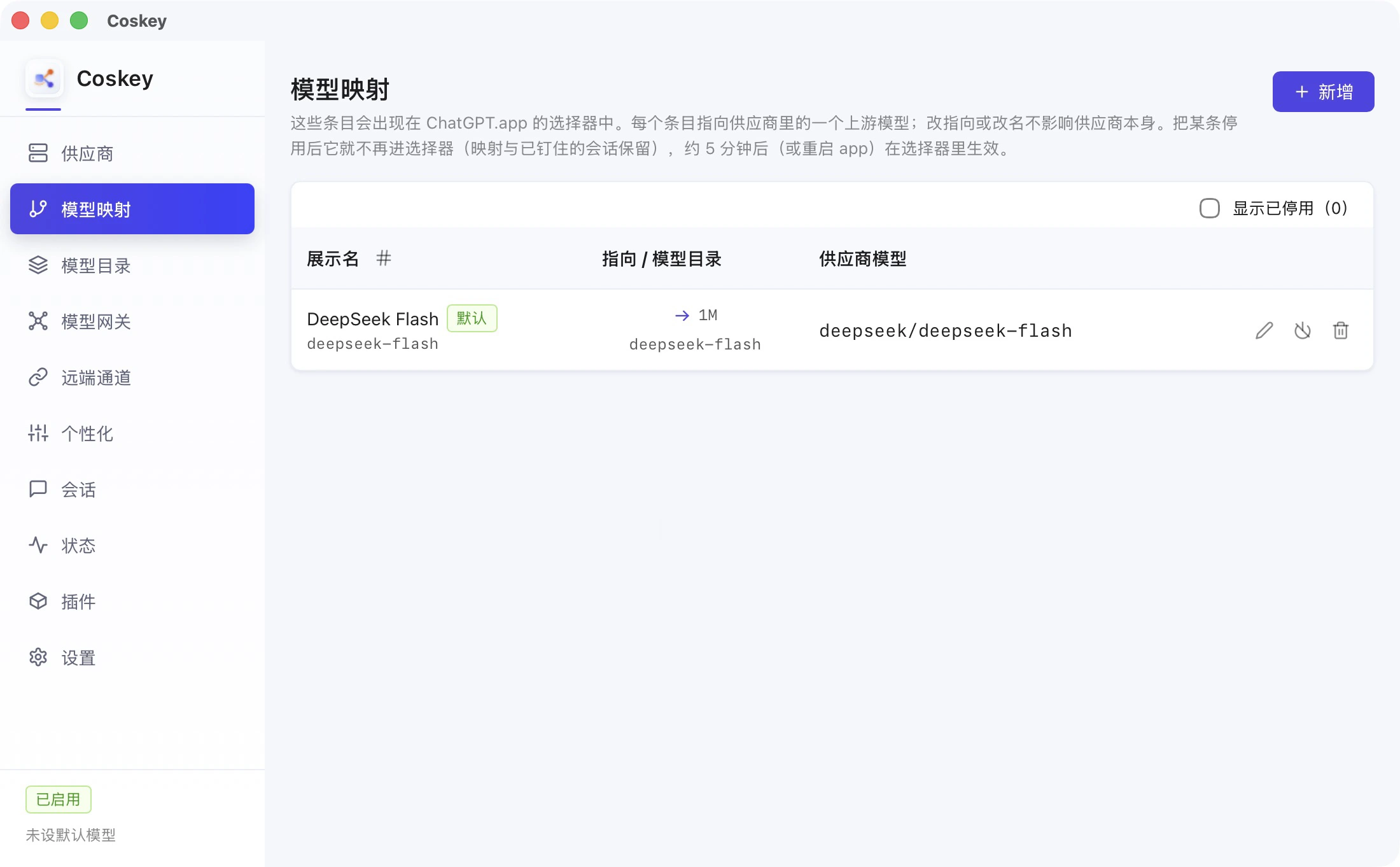
After confirming that the app model is enabled, start the managed CLI:
coskey codex
coskey codex resume
coskey codex starts a temporary loopback relay owned by this CLI process and gives the official
Codex CLI the Coskey model catalogue. Keep using this entry point for third-party models. Do not
copy its temporary port or token to a remote host or another agent.
4.2 Switch to a DeepSeek model with /model
After completing the app-model setup above, enter coskey codex:
- enter
/model; - select
DeepSeek Flashfrom the list. The picker shows the app model’s display name, while routing uses its app model id; - choosing a model opens the reasoning-level page. Press
sif DeepSeek should apply only to this session; - the next request is routed by the relay to the DeepSeek provider targeted by that mapping.
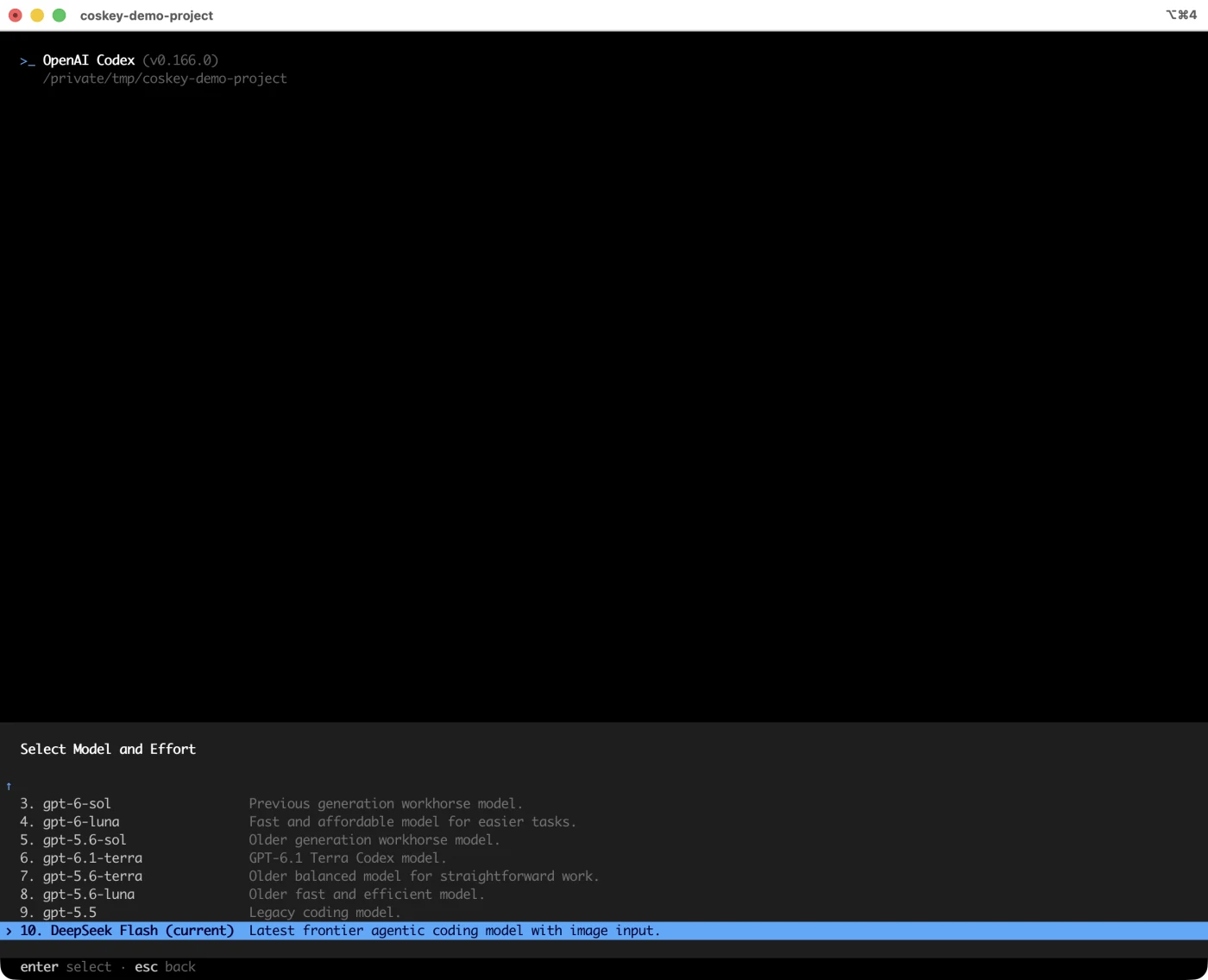
The session keeps the coskey provider; only the app model id changes, and the relay uses it to select the real upstream. The same session can switch from DeepSeek back to another third-party model or an official model without being recreated.
4.3 Reasoning-level page: press s or Enter
After selecting a DeepSeek model, the reasoning-level page asks how the choice should persist. The two keys have different scope:
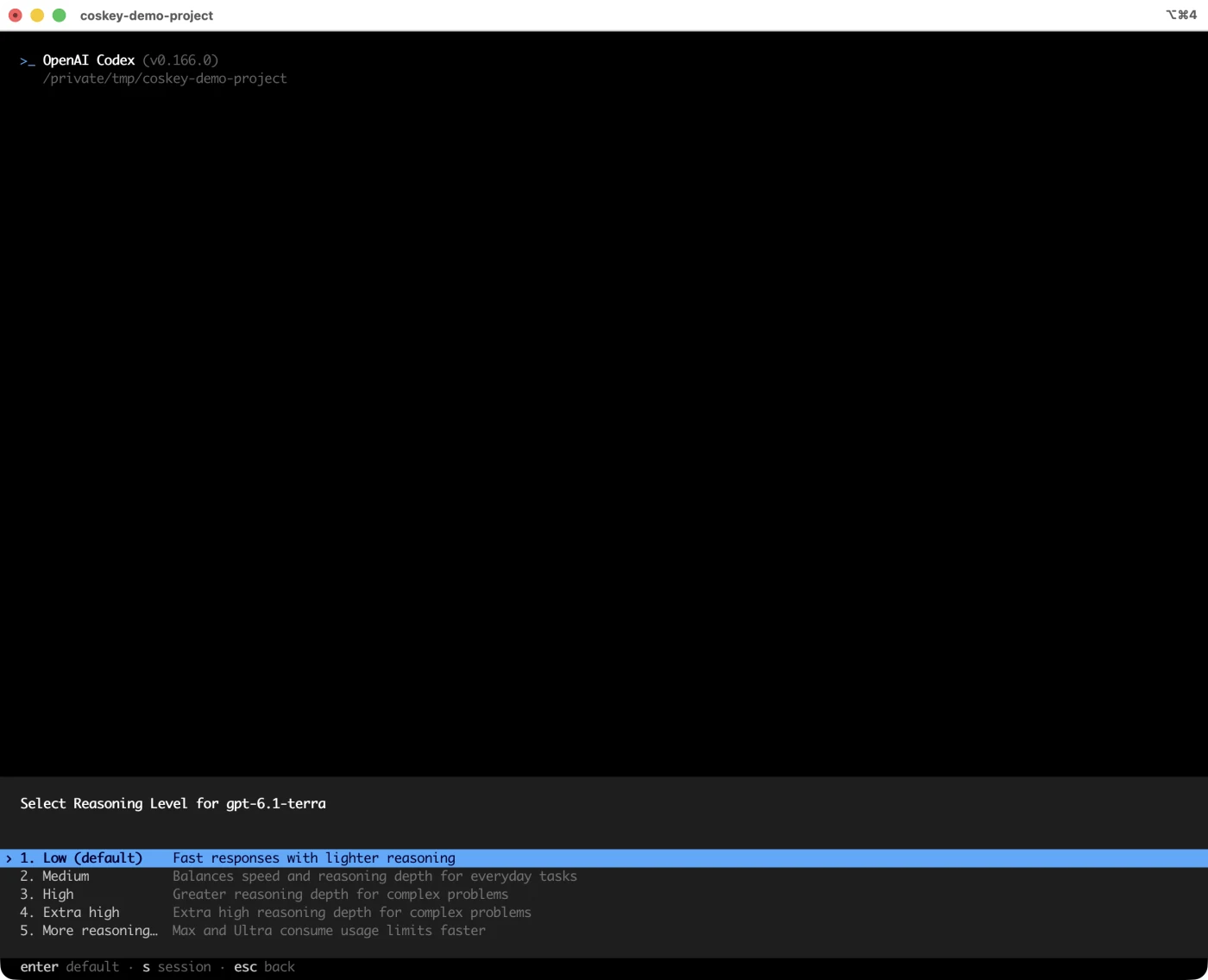
| Action | Scope |
|---|---|
Press s |
Change only this session; do not write Codex’s default configuration |
| Press Enter | Write the model and reasoning level to Codex’s config.toml, affecting later Codex sessions that read it |
Press s when DeepSeek should apply only to this task. Neither /model path changes
Coskey’s global active model. An external coskey use also does not update a running CLI; it
affects sessions started afterwards.
4.4 Optional: use -m to specify a model at startup
-m is a startup override for scripts or cases where the target model is already known. It is not
the main way to select a Coskey model. It takes the app model id; for example, localdev-large is
not the provider’s upstream model field:
coskey codex -m localdev-large
coskey codex exec -m localdev-large "summarize the current changes"
Without -m, a new session uses Coskey’s currently active model. resume preserves the model
already stored in that session. It changes the model only when you explicitly pass -m again.
5. Quick choice
| Goal | Use |
|---|---|
| Switch among several third-party models in a remote project | Remote tunnels → Through the local Coskey gateway → select several models for the client |
| Use one fixed provider model remotely | Remote tunnels → Direct to a local provider |
| Switch to a DeepSeek model in the local CLI | coskey codex, then enter /model and select DeepSeek |
| Use DeepSeek only for the current local CLI session | Press s on the reasoning-level page |
| Preselect a model for a script or one-shot task | coskey codex exec -m <app model id> "task" |
6. Troubleshooting
| Symptom | What to check |
|---|---|
| Remote model picker is empty | Whether the gateway is running, the client allows a visible model, and the remote has reloaded its provider |
| A newly added third-party model is missing remotely | Allow it for the client, then reconnect the host or wait for the catalogue cache to refresh |
| Remote shows only official models | The client allowlist may be missing the third-party app model |
Remote returns 401 / 403 |
Check whether the client token is still valid and the client scope covers the request source |
| Remote requests time out although SSH connects | Check whether the remote tunnel is running and its reverse endpoint points at the running gateway |
| Remote models or requests fail after quitting Coskey | The gateway stops with Coskey; reopen Coskey and confirm that the gateway is running |
A new mapping is missing from local /model |
Check that it is enabled with a valid target; reopen /model or restart the CLI |
| Selection changed but this turn still uses the old provider | A turn is not rerouted midway; the next turn uses the new model |
resume cannot open a CLI session |
Use coskey codex resume, not ordinary codex resume |
Related: Model gateway, Mappings and context windows, Coskey Tools.