The Model gateway exposes the models already configured in Coskey at a fixed OpenAI-compatible address for Codex, DeepSeek Harness, IDEs and scripts on this computer or the local network. It is separate from the relay that ChatGPT.app uses internally:
| Aspect | Relay inside ChatGPT.app | Model gateway |
|---|---|---|
| Used by | ChatGPT.app requests proxied by the Coskey wrapper | Other agents or remote Codex |
| Address | A random loopback port | A fixed port, 15721 by default |
| Authentication | Internal to the wrapper | A separate ckg_… token for each client |
| Lifecycle | Follows the wrapper | An independent gateway process that can start with Coskey |
Both use the same providers, keys and model mappings, but their listening sockets, tokens and runtime state are independent. The gateway does not require ChatGPT.app to be running. To use official models it does require a valid ChatGPT login on the host.
For a complete GUI walkthrough, see Use ChatGPT subscription models in DeepSeek Harness.
On a normal install the local Base URL is http://127.0.0.1:15721/v1. The screenshots in this
guide come from an isolated instance: the 15906 shown there is that instance’s assigned
port. Use the address displayed on your own gateway page.
1. First-time setup
First prepare the models you want to expose in Providers and upstream models and Mappings and context windows, then:
- Open Coskey → Model gateway and choose This computer or LAN;
- Confirm the listening port,
15721by default; - Enabled, valid app models and the currently available official models automatically become candidates. The gateway page does not apply a second global model filter;
- Click Enable gateway. If there is no client yet, Coskey creates
default-localand displays ackg_…token once; - Click Test connection and confirm that the health endpoint, authenticated model list and one minimal non-streaming request all pass.
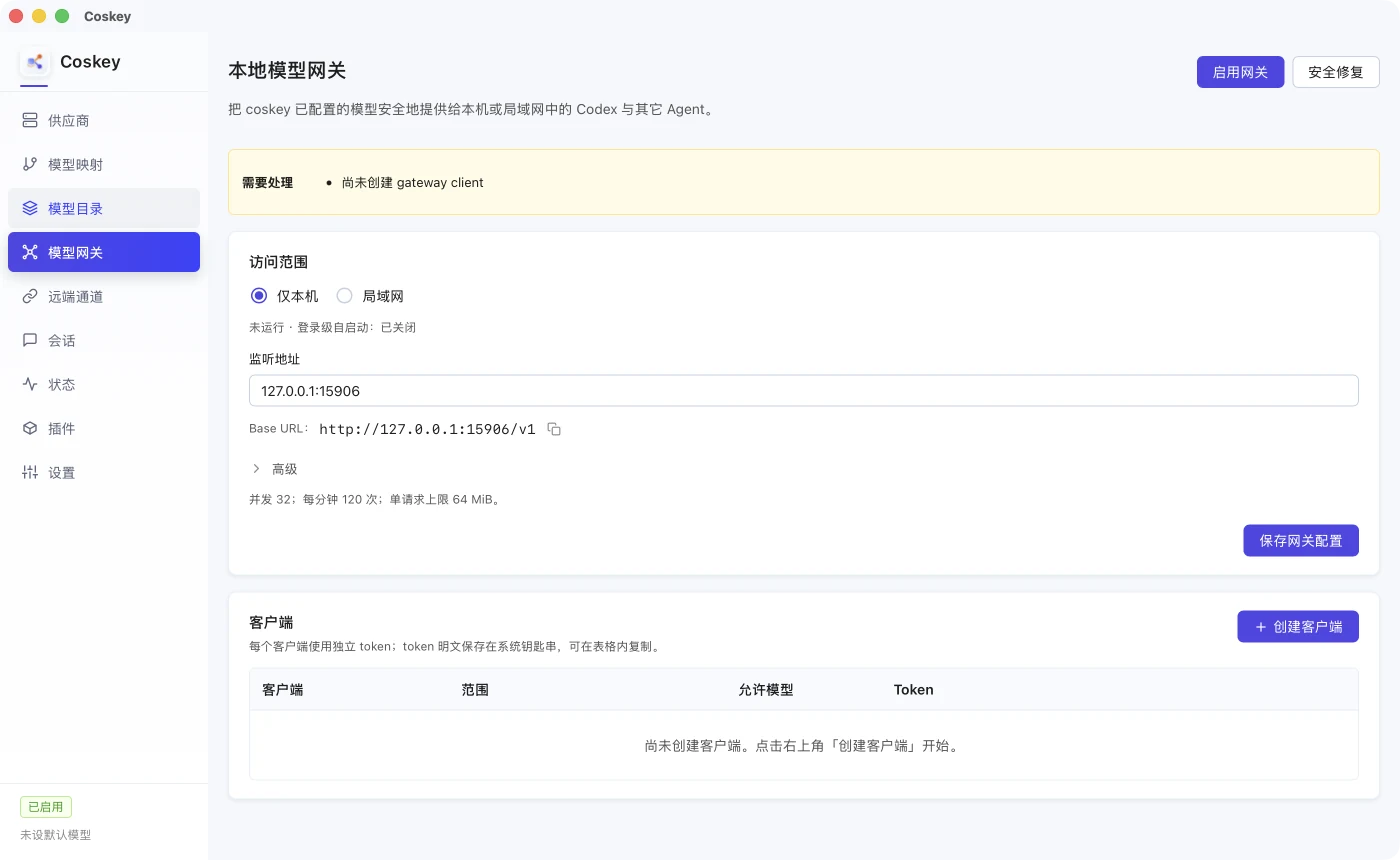
Once the gateway is running, the page displays the one-time token and test controls. The token in this screenshot is masked:
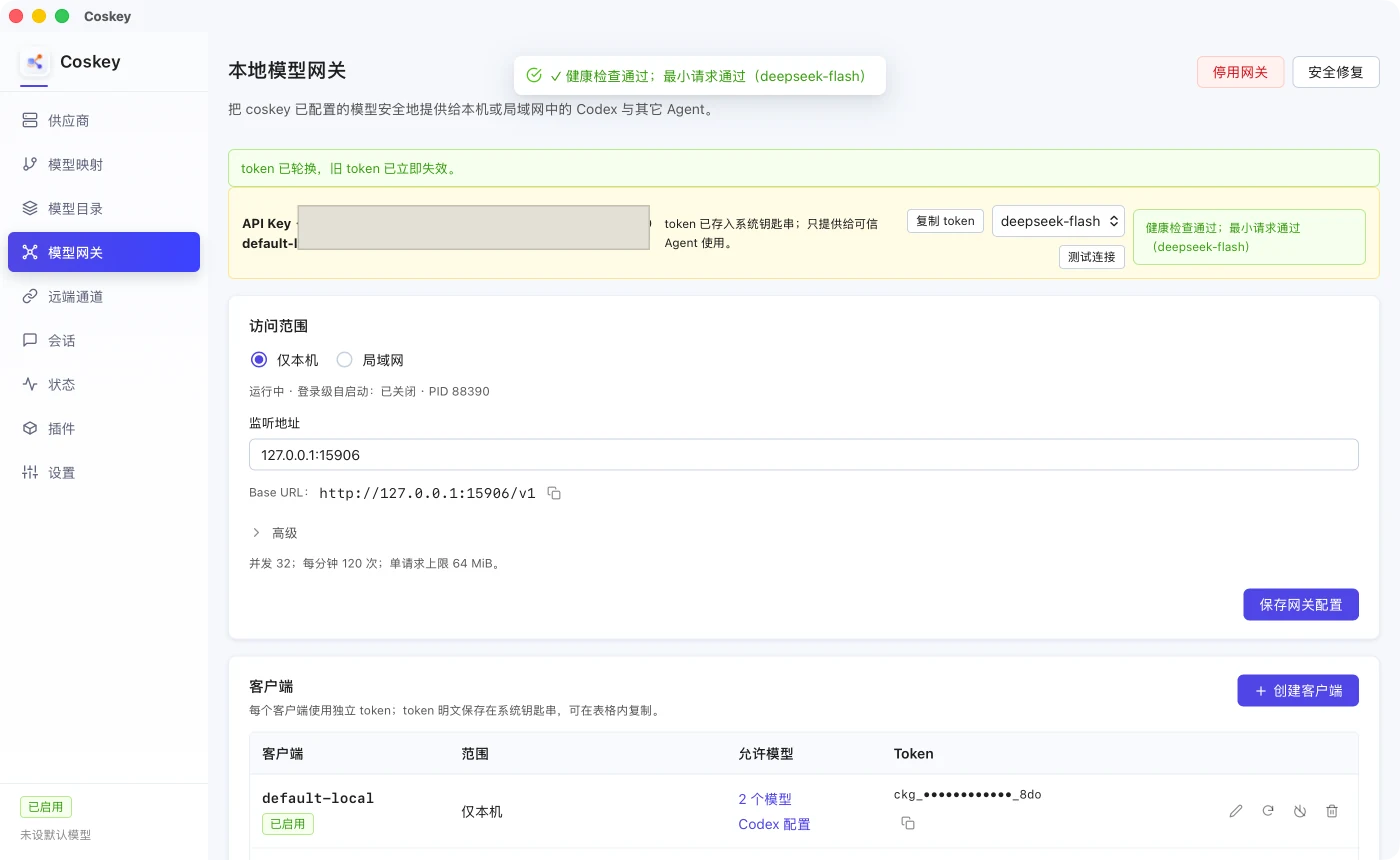
The test sends a real request and consumes the selected model’s quota: a third-party model uses its provider quota, while an official model uses the ChatGPT account subscription on the host. Third-party and official models have equal standing in the selector; any model allowed for the current client can be tested.
2. Clients and tokens
Every external agent should have its own client and token, so its models, credential rotation and revocation stay independent. Click Create client, then set an ID, scope and allowed models. The scope follows the current gateway scope by default, and the allowed models are selected from one checkbox list:
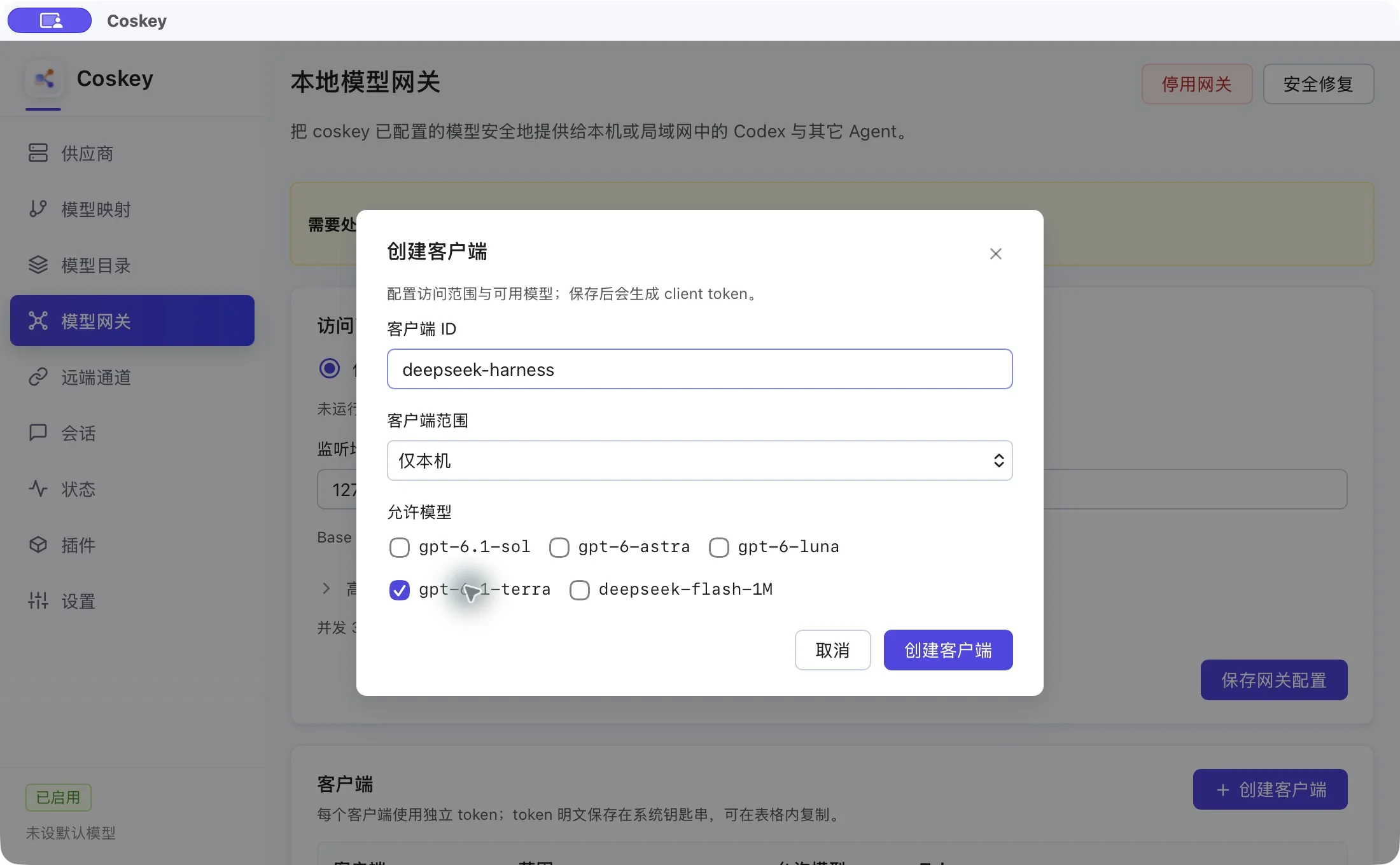
A client remains editable. Adding another app model does not require recreating the client or changing its token; select it under Edit on that row. The Allowed models column has two entry points:
- click the model count to open Exposed models and test each one;
- click Codex configuration, choose an allowed model and copy the generated configuration.
The token rules are:
- only the plaintext token is stored in the system keychain;
coskey.tomlstores only its SHA-256; - the GUI shows the full token only when enabling, creating or rotating it; afterwards the copy button asks the backend to read the keychain and write it to the clipboard;
- a legacy hash-only client must be rotated once before its token can be copied;
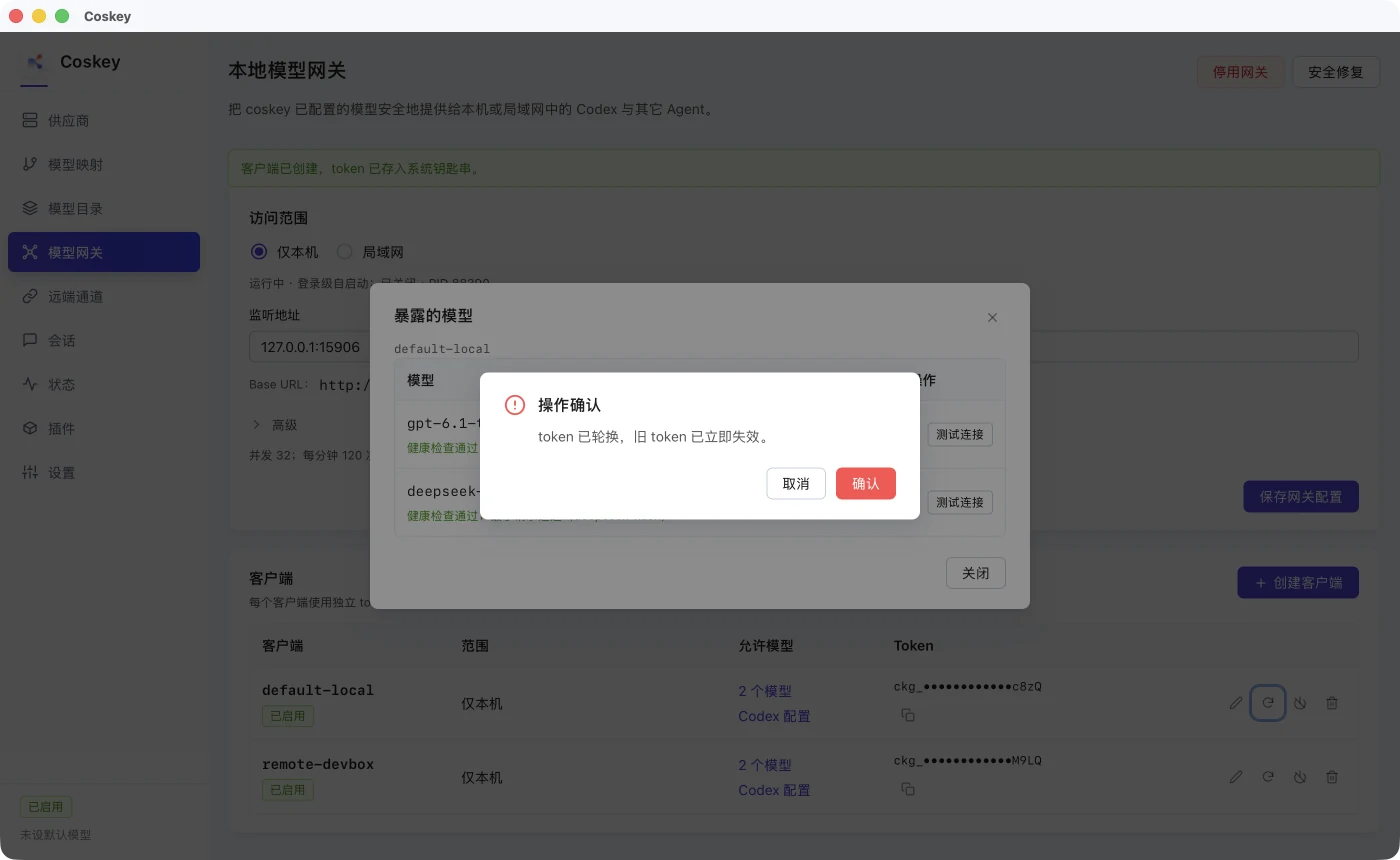
- Rotate token invalidates the old token immediately and shows the new one once;
- Disable keeps the client metadata but stops accepting requests;
- Revoke / delete makes the next request return
401.
Rotation asks for confirmation because any agent still using the old token will disconnect at once:
3. Generate Codex configuration
Click Codex configuration on a client row, choose one of its allowed models and copy the configuration:
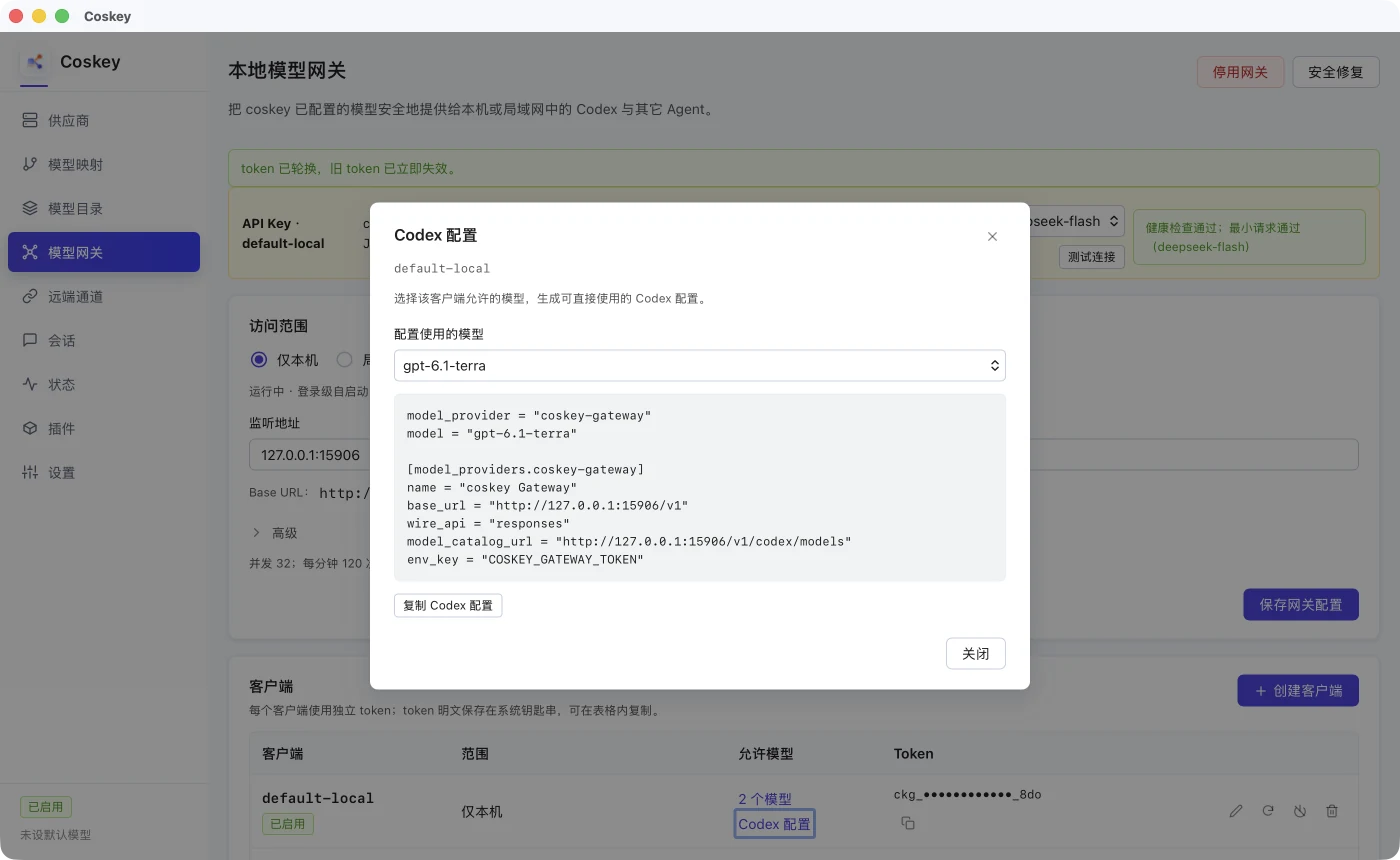
Its base_url points at the fixed gateway, and the model id exactly matches what
/v1/models and /v1/codex/models return. model_catalog_url lets Codex pull the model
catalogue dynamically, so adding a mapping normally does not require changing the remote
configuration. A typical local configuration is:
model_provider = "coskey-gateway"
model = "localdev-large"

[model_providers.coskey-gateway]
name = "Coskey Gateway"
base_url = "http://127.0.0.1:15721/v1"
wire_api = "responses"
model_catalog_url = "http://127.0.0.1:15721/v1/codex/models"
env_key = "COSKEY_GATEWAY_TOKEN"
Put the client token in the environment instead of a command-line argument or a repository:
read -rs COSKEY_GATEWAY_TOKEN
export COSKEY_GATEWAY_TOKEN
codex
Remote Codex uses the same structure with an address that the remote client can reach. The
desktop interface currently offers only This computer and LAN. A public HTTPS reverse
proxy also requires a public scope address plus exact source CIDRs; that remains a backend
and CLI capability and is not exposed in the GUI yet.
The gateway hot-reloads catalogue changes and client revocation. Codex itself caches the model
catalogue for about five minutes, so reopen /model or restart the remote app-server after
changing allowed models.
If you would rather not write the remote configuration by hand, Coskey Tools can build a plan for an SSH host you name explicitly. It performs the remote write and tunnel setup only after you confirm the host, models and impact.
4. Access scopes and official models
| Scope | Purpose | Key constraint |
|---|---|---|
local / This computer |
Agents on the same machine | Listens on loopback only |
lan / LAN |
A local network, Tailscale, WireGuard or another private network | Listens on 0.0.0.0; token required; plain HTTP is allowed by default and can be turned off |
public |
A server reached through an HTTPS reverse proxy | Base URL must be https://, and each client must bind an exact source CIDR; the GUI does not expose this scope |
Switching to LAN changes the listen address to 0.0.0.0. The page enumerates local IPv4
interfaces and prefers a real private network over a proxy TUN. Loopback, link-local, multicast
and reserved ranges are not offered; with several interfaces you can choose one manually, and
the Base URL and Codex configuration follow it. Switching back to This computer restores
127.0.0.1.
LAN mode allows plain HTTP by default, so the token and request content are not encrypted. Use
it only on a trusted network, or place an HTTPS reverse proxy such as Nginx in front. The
client scope must also match where the request comes from: a This computer client invoked
from a LAN address receives 403.
Official and third-party models have equal standing for a client and share the ChatGPT account
and subscription quota on the host. The gateway uses the host’s CODEX_HOME/auth.json login
only for upstream requests; it reads it without refreshing it and never returns the host OAuth
token to a client. API-key login is not a ChatGPT subscription login. Without that subscription
login, official-model requests fail while third-party models continue to work.
5. Which models are exposed
The current local configuration determines the candidate set:
- app models that are enabled and valid;
- official models currently available in the catalogue;
- disabled, dangling or unresolvable mappings are excluded;
- each client’s
allowed_modelsselects a subset of that candidate set.
App model ids must match exactly. If the same id is selected from both the app models and the official catalogue, the gateway does not guess which one to use and exposes neither; rename one of them first. Changing a client’s allowed models does not require a new token.
6. Running and lifecycle
Each time Coskey starts, it checks the gateway configuration. If the gateway is enabled but its process is not running, Coskey starts it in the background; if it is already running, Coskey does not start a second process. Closing the main window only hides Coskey in the system tray, and the gateway keeps running. Choose Quit Coskey from the tray menu to stop it. A gateway managed by the GUI does not install a login-level KeepAlive service.
To keep it running without the Coskey GUI, use the command line:
coskey gateway enable
coskey gateway status
enable installs the login-time service. disable removes the service and stops the current
process but keeps the configuration, clients and token hashes, ready to enable again later.
Security repair on the gateway page only fixes determinate problems: an invalid listen
address returns to the loopback default, a public configuration without HTTPS is downgraded to
local, invalid CIDRs are removed, clients with a corrupt hash or a public client without an exact
source are disabled, and if there are no clients it creates default-local and shows the token
once.
7. Using coskey codex on this computer
You do not need to enable the fixed gateway to use the official Codex CLI locally:
coskey codex
coskey codex -m localdev-large
coskey codex exec "inspect this project"
coskey codex resume
The launcher creates a random loopback port and a per-process token, passes them to Codex
through environment variables and does not write ~/.codex/config.toml itself. Codex’s
/model uses a dynamic model_catalog_url, and the relay hot-reloads Coskey mappings while it
runs. The relay stops when the CLI exits, receives a signal or terminates abnormally.
After choosing a model in /model and reaching the reasoning-level screen:
- Enter writes the model and reasoning level to Codex’s
config.toml, affecting later ordinarycodexruns; schanges only the current session without writing either value;- neither path changes Coskey’s global default model.
8. CLI, testing and troubleshooting
The main GUI actions have command-line equivalents:
coskey gateway enable
coskey gateway disable
coskey gateway status [--json]
coskey gateway client add <ID> [--scope local|lan|public] [--model <MODEL_ID>]...
coskey gateway client list
coskey gateway client rotate <ID>
coskey gateway client remove <ID>
coskey gateway test --model <MODEL_ID>
gateway test reads the token only from COSKEY_GATEWAY_TOKEN; it never accepts one as a
command-line argument, which keeps the token out of shell history. It checks /healthz, the
authenticated model list and one minimal non-streaming request in that order:
read -rs COSKEY_GATEWAY_TOKEN
export COSKEY_GATEWAY_TOKEN
coskey gateway test --model localdev-large
For routine diagnosis, check the health endpoint or run the unified health check first:
curl -s http://127.0.0.1:15721/healthz
coskey doctor
coskey gateway status| Symptom | What to check |
|---|---|
401 / invalid token |
Use a token from the current client; after rotation, update the caller |
403 |
Make sure the client scope covers the request source; a LAN request cannot use a This computer client |
| Empty model list | Check whether the client’s allowed models contain the target id and whether the caller refreshed the catalogue |
host_login_required |
Check that the gateway process uses the expected CODEX_HOME and that it contains a ChatGPT login |
| Third-party models test, official models do not | Validate the host’s ChatGPT subscription login; API-key login is not a replacement |
| Codex does not show a new model | Its catalogue cache has not refreshed; reopen /model or restart the app-server |
| Gateway exits unexpectedly | Check the Status page entries for gateway runtime, port, scope, host login and keys; try disable followed by enable |
The gateway log is ~/.coskey/logs/gateway.log; it never contains tokens, upstream keys,
prompts or completions. The official Responses backend accepts streaming requests only; the
non-streaming connection test aggregates the SSE response into JSON inside the gateway.
Related: Providers and upstream models, Mappings and context windows, Codex model selection, Coskey Tools, Status and settings.