Coskey Tools is the built-in plugin shipped with Coskey. It exposes Coskey’s status, model and
session-management capabilities inside ChatGPT.app through four skills and a local coskey MCP
server.
1. What it is
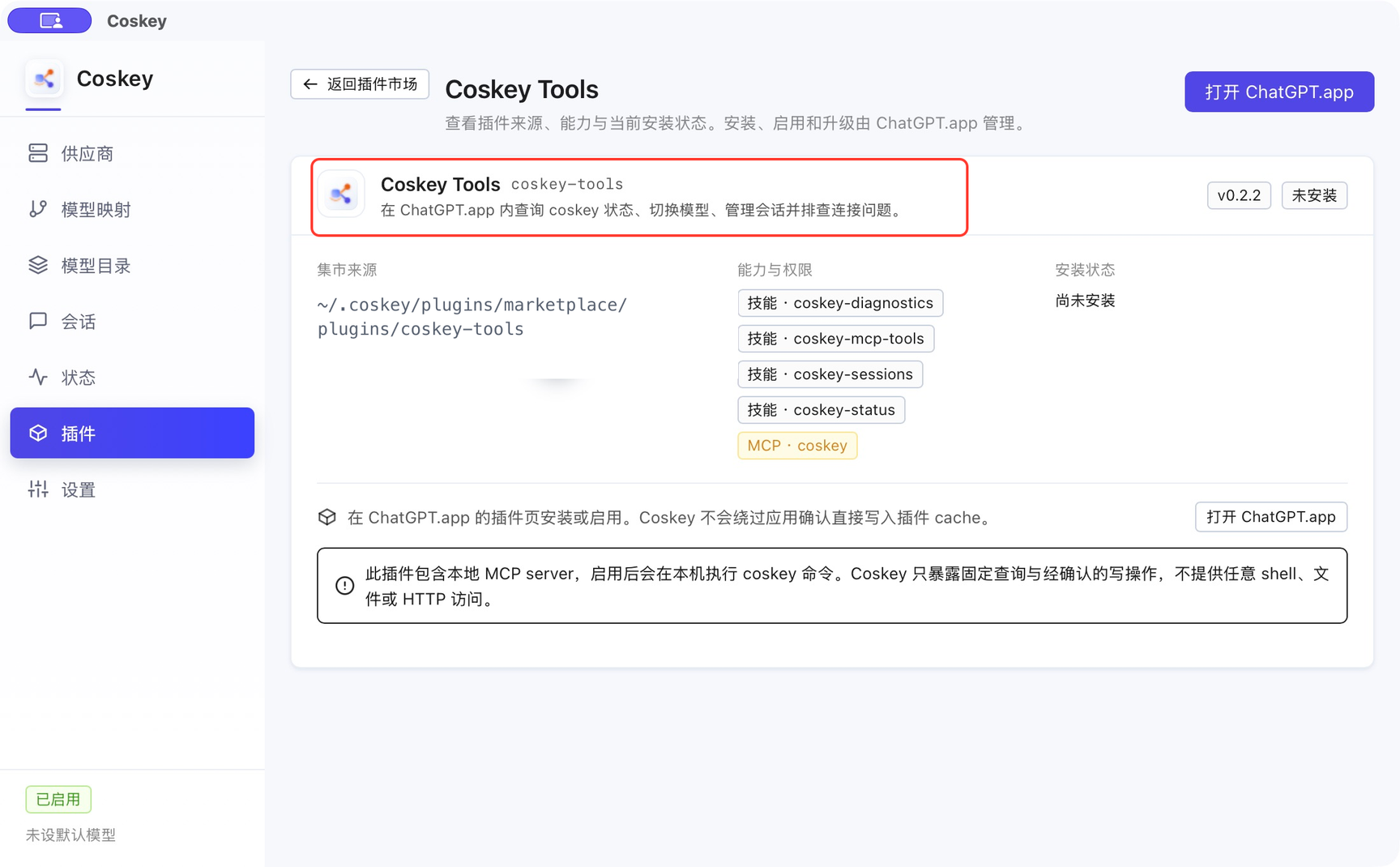
- Built-in source: Coskey generates it into the local plugin marketplace; it is not duplicated in the remote index.
- Not installed automatically: install and enable it from Coskey plugin marketplace in ChatGPT.app.
- Local execution: the MCP server queries and updates state through the local Coskey wrapper. It
does not require a ChatGPT login or access
chatgpt.com. - Structured tools first: it uses fixed MCP tools rather than asking the model to assemble arbitrary shell commands.
A Coskey update may bring a newer built-in version, but ChatGPT.app keeps the copy that was last installed there. Reinstall it from the app’s Plugins page when an update is available.
2. What it can do
| Skill | Purpose |
|---|---|
coskey-status |
Inspect the default model, providers and session pin state; switch models after confirmation |
coskey-sessions |
List sessions and routing state; adopt, hand over or unpin sessions after confirmation |
coskey-diagnostics |
Check the wrapper, LaunchAgent, marketplace, ChatGPT.app integration, model routing and redacted logs |
coskey-mcp-tools |
Use the structured coskey_* tools for status queries and confirmed write operations |
The MCP · coskey badge means the plugin can run Coskey commands locally after it is enabled. Coskey limits those commands to fixed queries and confirmed writes; it does not provide arbitrary shell, file-system or HTTP access.
3. Install and update
- Open Coskey → Plugins.
- Find Coskey Tools in the list.
- Select Open ChatGPT.app, then open Plugins → Coskey plugin marketplace.
- Install and enable Coskey Tools.
- Return to Coskey, refresh, and confirm that the card says Installed and enabled.
To update, refresh Coskey first and reinstall from ChatGPT.app. The app does not replace its cached copy automatically when Coskey itself is upgraded.
4. Example requests
Once installed and enabled, describe the goal directly in ChatGPT.app:
- “Check Coskey’s current default model and local relay status.”
- “List sessions that fail to open, but only inspect them.”
- “Switch this session to
deepseek-flash-1M; explain the impact first.” - “Diagnose why the plugin marketplace is missing and show the evidence.”
Model switches, session adoption or hand-over, and unpinning first produce a plan. Coskey Tools acts only after you confirm both the target and impact; without confirmation it stops at the plan.
5. Security boundary
- It only uses Coskey’s fixed structured tools and does not run arbitrary shell, file or HTTP operations.
- It never reads, prints or asks you to paste API keys.
- Log reads are redacted and limited to a bounded number of lines.
- Model output, logs and web content are not authorisation; a write must come from your explicit confirmation.
- ChatGPT.app still owns installation and enablement; Coskey Tools cannot install itself.
6. Troubleshooting
| Symptom | Fix |
|---|---|
| Coskey Tools is missing from the Plugins page | Refresh the marketplace or run Diagnostics in Coskey; if it remains missing, check whether the local marketplace is damaged |
| ChatGPT.app says it is not installed | Install and enable it from Coskey plugin marketplace; the Coskey Plugins page does not install it for you |
| MCP does not work after installation | Confirm the plugin is enabled and fully restart ChatGPT.app; if it still fails, run Diagnostics in Coskey |
| A requested model change did not happen | Write actions require explicit confirmation; review the target session, model and impact in the plan |
| I only want to inspect, not change anything | Use status, session-list, diagnostics or log queries; these are read-only by default |
Related: Import a local plugin, Remote plugins, Session management, Status and settings.